 Prodia
Best AI media generation APIs for SaaS products 2027
Compare AI media generation APIs for SaaS and learn how to evaluate image workflows, tenant controls, and job recovery before launch.
Best overall for developer-led media workflows: Prodia. Best for a Google Cloud application: Vertex AI; best for model-specific experimentation: Replicate. The best AI media generation API for SaaS in 2027 fits your production architecture, not just your preferred output sample.
- Prodia is the best AI media generation API for SaaS teams prioritizing developer-led image and media workflows.
- Choose OpenAI for image generation and editing within an OpenAI-based application.
- Choose Vertex AI for Google Cloud integration, or Replicate for model-specific experimentation.
- Choose Hugging Face Inference Endpoints when deploying a selected model is the central requirement.
- Evaluate completed outputs, failure handling, and tenant controls before committing to an inference API.
Why this matters
A generation endpoint is only part of a SaaS feature. Your application also needs to authorize requests, track jobs, associate outputs with customers, handle failures, and enforce usage limits.
That distinction drives this 2027 shortlist. An API that produces an attractive demonstration still needs an application workflow around it; the right choice depends on which infrastructure responsibilities you want to retain.
Choose the operating model before choosing the model. Otherwise, you risk selecting an endpoint first and discovering its integration requirements after your product interface is already committed.
What makes the best AI media generation API for SaaS?
Use these criteria to evaluate each option against your actual feature:
- Workflow fit: Does the integration match an interactive editor, background generation queue, or batch process?
- Media coverage: Does the specific endpoint support the input and output types your feature requires?
- Operational ownership: Which responsibilities belong to the provider, and which remain with your engineering team?
- Application controls: Can your backend enforce tenant permissions, usage limits, and cancellation rules around the integration?
- Model lifecycle: Can you identify model versions, evaluate changes, and manage compatibility deliberately?
- Output suitability: Do generated results satisfy your product requirements, including content rules and downstream processing?
Treat these as acceptance criteria, not feature-counting exercises. A broad model catalog adds little value when your application needs one stable workflow; dedicated deployment adds little value when your team primarily wants a managed generation integration.
Best APIs at a glance
| Option | Best for | Standout distinction | Key limitation or trade-off |
|---|---|---|---|
| Prodia | Developer-led image and media workflows | API platform focused on production media-generation infrastructure | Your application still needs tenant controls and output handling |
| OpenAI image API | Image generation and editing in an OpenAI-based application | Image capabilities within the OpenAI API ecosystem | Image integration does not cover every media requirement |
| Google Cloud Vertex AI | Applications already built around Google Cloud | Generative media models within a cloud AI platform | Cloud project, identity, and service configuration become part of integration |
| Replicate | Experimentation with specific models | Model-oriented API access | Input schemas and behavior depend on the selected model |
| Hugging Face Inference Endpoints | Dedicated deployment of a selected model | Managed inference endpoints for model deployment | Deployment and model configuration require engineering decisions |
The table separates operating models rather than claiming a universal performance winner. For your 2027 evaluation, shortlist the options that fit your architecture before comparing generated results.
1. Prodia: best media generation API for developer-led workflows
Prodia provides an API platform for developers building image and media generation into applications. Its stated focus is turning generation infrastructure into fast, scalable production workflows rather than making developers assemble that infrastructure themselves.
Best for: SaaS engineering teams that want an API-centered approach to image and media generation. Start here when your product needs generated assets and your team wants to focus its work on the application experience.
Prodia runs every model through one inference endpoint, POST https://inference.prodia.com/v2/job, using Bearer authentication, a job type, and a model-specific config. Its image generation guide lists text-to-image job types for FLUX.2, FLUX.2 Klein, FLUX.1 Kontext, Nano Banana, Gemini 3, Recraft V4, SDXL, Seedream, and Wan 2.7, and models such as SDXL and FLUX.2 add separate image-to-image and editing job types.
Prodia pros:
- One request shape across many models, so a SaaS backend needs one adapter rather than one per provider.
- Generation and editing job types sit on the same endpoint, which suits features that create and then revise customer assets.
- The v2 token stays in your backend, alongside your tenant controls and usage limits.
Prodia cons and implementation trade-offs:
- An inference integration does not replace your application’s authorization, tenant accounting, or asset lifecycle.
- Endpoint suitability still needs validation against your specific inputs, output requirements, and failure-handling design.
Keep your application boundary explicit. Store customer ownership and business state in your own system, and treat provider execution state as separate information rather than the sole record of a customer action.
Verdict: Buy for developer-led media workflows, after validating the endpoint against your feature’s acceptance criteria.
2. OpenAI image API: best for an OpenAI-based image feature
OpenAI provides API capabilities for image generation and editing. This makes it a relevant candidate when your SaaS feature creates images from prompts or modifies existing images.
Best for: Teams building an image feature inside an application that already integrates with OpenAI. Keeping related integrations within one provider ecosystem can simplify the shape of your application code, although each endpoint still needs its own error handling.
OpenAI image API pros:
- Supports image generation as an API use case.
- Supports image-editing workflows.
- Fits applications already using the OpenAI API ecosystem.
OpenAI image API cons:
- An image endpoint is not a complete answer to a broader video or audio requirement.
- Existing integration familiarity does not establish that image outputs meet your product’s acceptance criteria.
Evaluate generation and editing separately. A feature that creates illustrations from text has different requirements from one that must preserve customer-supplied details during an edit.
Do not select this option solely because your application already uses a text model. Reusing an API provider is useful only when the image workflow also fits.
Verdict: Buy for an image-focused feature that fits the OpenAI integration model; skip it as a substitute for a complete multimedia evaluation.
3. Vertex AI: best for SaaS applications on Google Cloud
Google Cloud Vertex AI provides access to generative AI models, including image and video generation through model families such as Imagen and Veo. It places those capabilities within a broader cloud platform.
Best for: Teams whose application infrastructure and operational controls already center on Google Cloud. Evaluate the relevant model and endpoint, not Vertex AI as a single interchangeable generation service.
Vertex AI pros:
- Provides a Google Cloud route to generative media capabilities.
- Fits cloud project and identity-based administration.
- Offers a platform context for teams managing multiple AI workloads.
Vertex AI cons:
- Project configuration, permissions, and service setup are part of implementation.
- Different models have distinct interfaces and requirements; platform membership does not make them interchangeable.
The strongest reason to choose Vertex AI is architectural alignment. Your team should still check the selected model’s supported inputs, output handling, applicable terms, and regional requirements before committing.
For a 2027 cloud-based shortlist, distinguish organizational convenience from feature suitability. A familiar infrastructure platform reduces neither the need for output review nor the need to test failure paths.
Verdict: Buy when Google Cloud alignment is a requirement and the selected media model passes your application tests.
4. Replicate: best for model-specific experimentation
Replicate exposes machine-learning models through APIs. Its model-oriented approach makes it relevant when you want to evaluate particular generation models without building each model’s serving integration from scratch.
Best for: Product and engineering teams exploring which model fits a feature before standardizing the implementation. Define the feature’s acceptance criteria first so experimentation produces a decision rather than an expanding collection of samples.
Replicate pros:
- Provides API access to a catalog of models.
- Supports model-specific evaluation without requiring an identical self-managed deployment for each candidate.
- Makes the selected model an explicit part of your integration decision.
Replicate cons:
- Model inputs, outputs, and behavior vary; a shared platform does not guarantee a shared contract.
- You need to review the selected model’s documentation and applicable usage terms individually.
Keep provider-specific fields behind an adapter in your backend. Your frontend should request a product action, such as generating an illustration, rather than depend directly on a model’s parameter names.
That separation makes experimentation more manageable. It also prevents a successful prototype from becoming an application-wide dependency on one model’s request schema.
Verdict: Buy for structured model evaluation; hold production selection until a specific model passes your workflow tests.
5. Hugging Face Inference Endpoints: best for selected-model deployment
Hugging Face Inference Endpoints provides managed deployment of models behind inference endpoints. It fits a different decision from simply choosing a ready-to-integrate media API: your selected model and its deployment requirements become central.
Best for: Engineering teams that have identified a model and want a managed endpoint for serving it. Consider this route when model choice is a deliberate product or technical requirement.
Hugging Face Inference Endpoints pros:
- Centers the deployment around a selected model.
- Provides managed inference infrastructure rather than requiring a fully self-built serving stack.
- Fits teams that want explicit involvement in deployment configuration.
Hugging Face Inference Endpoints cons:
- Model compatibility and deployment configuration require engineering review.
- A model endpoint does not itself provide the surrounding media workflow, asset management, or customer-facing application.
Review the model’s license, serving requirements, and output contract before treating deployment as the final step. Successful inference is necessary, but your SaaS feature also needs predictable application behavior around it.
Avoid choosing this route merely because a model demonstration looks promising. It fits teams prepared to own the model-selection decision and the application integration around that model.
Verdict: Buy when selected-model deployment is a requirement; skip when your priority is minimizing deployment decisions.
How we ranked these APIs
The ranking prioritizes fit for SaaS media features: production workflow focus first, followed by distinct integration and deployment needs. It is an editorial decision guide, not a latency leaderboard.
Each recommendation owns a separate use case. Provider ecosystem, model experimentation, and dedicated deployment solve different engineering problems; ranking them only by sample quality would hide those differences.
Disclosure: Prodia publishes this guide and sells image and media inference API access. Apply the same acceptance and failure tests to Prodia and every alternative.
How to validate your shortlist in 2027
Run the same application-level evaluation for each candidate. Keep prompts, source assets, acceptance rules, and workload conditions consistent so differences remain interpretable.
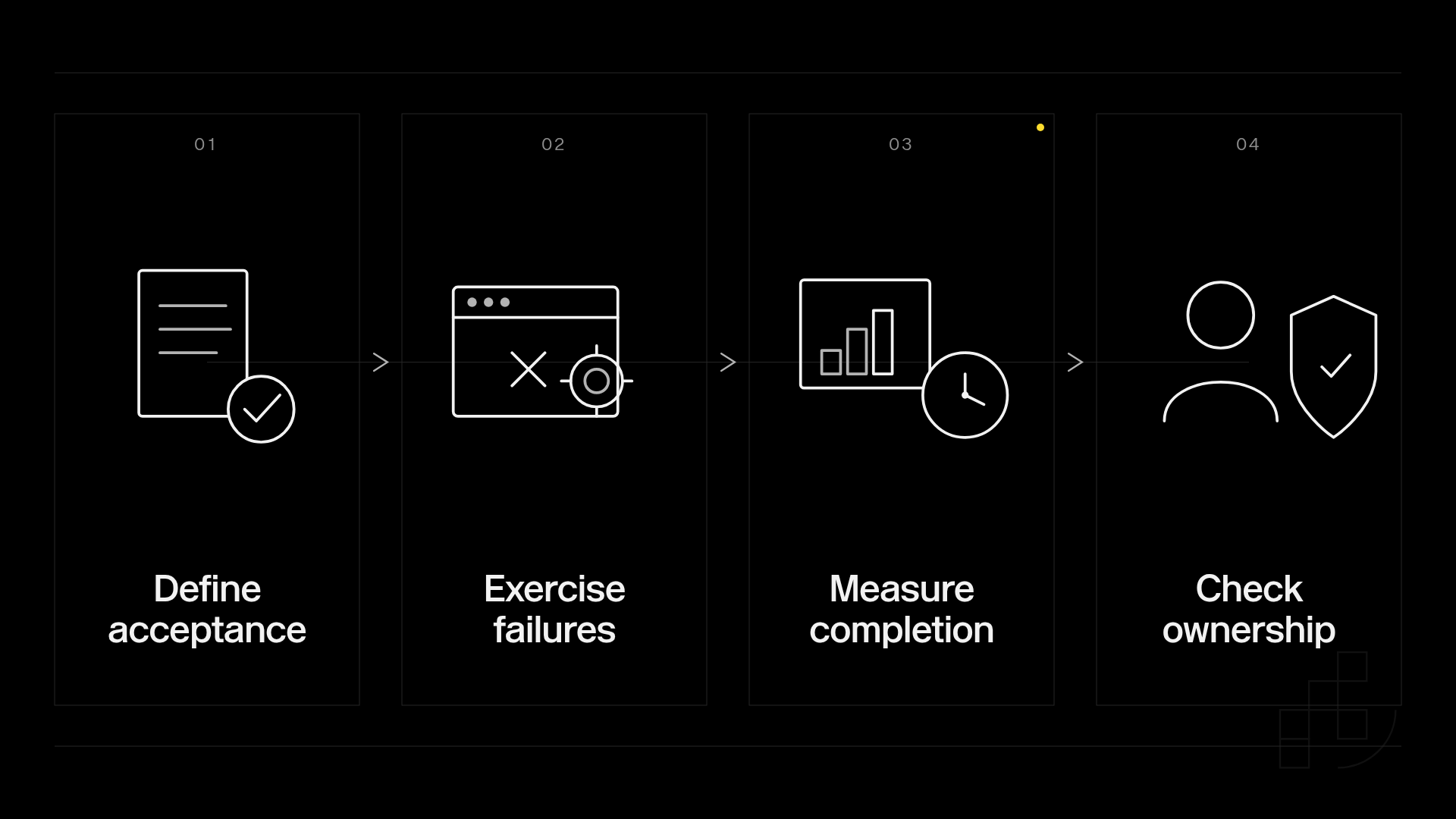
Use this sequence:
- Define acceptance: Specify acceptable outputs, required formats, prohibited content, and the customer action being supported.
- Exercise failures: Test invalid inputs, interrupted requests, duplicate submissions, and downstream storage errors.
- Measure completion: Record elapsed time from customer action to a usable asset, not just the initial API response.
- Check ownership: Confirm how your application associates jobs and assets with tenants, deletion requests, and support investigations.
For latency reporting, separate the 50th percentile, 95th percentile, and 99th percentile. These describe different parts of your observed distribution; an average alone does not show the slow end of the customer experience.
Also separate successful completion from technical response success. A request can return successfully while producing an asset your application rejects, so track both outcomes explicitly.
Which media generation API should you choose?
Choose Prodia for developer-led image and media workflows. Choose OpenAI for an OpenAI-based image feature, Vertex AI for Google Cloud alignment, Replicate for model-specific experimentation, or Hugging Face Inference Endpoints for selected-model deployment.
For a 2027 implementation, make the final decision on a complete workflow: accepted input, completed generation, usable asset, recorded ownership, and recoverable failure. That is the unit your customer experiences.
Evaluate your media generation integration
Start with your application workflow and validate the generation requirements.
FAQ
What’s the best AI media generation API for SaaS?
The best AI media generation API for SaaS matches your media requirements and operating model. Use the shortlist to distinguish production media workflows, provider-specific image features, model experimentation, and selected-model deployment.
Should I use the same API provider for text and images?
Use the same provider only when its image capabilities fit your feature. An existing text integration is an implementation convenience, not evidence that image quality, editing behavior, or failure handling meets your requirements.
Is Vertex AI better than a standalone media API?
Vertex AI is the stronger architectural fit when Google Cloud integration is a requirement. A standalone media API deserves evaluation when your primary requirement is the generation workflow rather than alignment with a broader cloud platform.
Is Replicate suitable for evaluating different generation models?
Replicate supports model-specific API evaluation. Keep your test inputs and acceptance criteria consistent, and review each model’s interface and terms separately.
When should I choose a dedicated inference endpoint?
Choose a dedicated inference endpoint when deploying a selected model is an explicit requirement. Your team still needs to evaluate model compatibility, deployment configuration, and the application workflow around inference.
How should I measure generation latency?
Measure generation latency from the customer action to a usable asset in your application. Track percentile distributions and distinguish provider execution time from queuing, transfer, validation, and storage work.
What should stay in my SaaS backend?
Keep authorization, tenant ownership, usage enforcement, and application job state in your backend. Keep provider credentials there too, rather than exposing them to the browser.
One last thing
A retry is another request, not proof that the original request failed. Design your application so an interrupted connection does not automatically create duplicate customer actions or lose track of an output that completed elsewhere.
Before launch, trace one interrupted job from submission through recovery. A generation feature is ready for customers only when your team can explain what happened and what the customer should do next.