 Prodia
Best AI video generation APIs for marketing teams 2027
Comparing AI video generation APIs for marketing teams (Prodia, fal, Replicate, Runway and Luma), with a pilot plan and cost per approved clip.
An AI video generation API for marketing lets your team’s tools turn briefs, product images, and prompts into short video clips automatically, so you can produce ad variants, social cuts, and product videos at volume. Start with Prodia for low-cost, high-volume clips on LTX 2.5 and MiniMax H3 Turbo through one API. Compare fal, Replicate, Runway, and Luma for model breadth, custom models, or a specific creative model.
Bottom line
- Start with Prodia if you need many short marketing clips at low cost per clip: LTX 2.5 and MiniMax H3 Turbo run behind one API with async jobs and per-job cost readback.
- Consider fal if you want a broad catalog of video models to test from one API key.
- Consider Replicate if you need a niche community video model or want to deploy your own.
- Consider Runway or Luma if a specific creative model (Runway’s own models, or Luma’s Ray video model with reframing) is the requirement.
- Judge clips that survive brand review and editing, not demo reels.
Key facts
- LTX is about $0.019 and H3 Turbo about $0.073 depending on tier, duration, and canvas; check current pricing on Prodia’s docs.
- Prodia documents LTX 2.5 text-to-video and image-to-video clips from 1 to 10 seconds (Prodia pricing docs).
- Prodia documents MiniMax H3 Turbo text-, image-, and reference-to-video jobs, billed by output duration from 4 to 15 seconds (Prodia pricing docs).
- Adding
?price=truereturns the billed product and dollar amount for each completed job (Prodia price docs). - Provider facts checked November 9, 2026. No cross-provider quality or speed ranking is claimed.
What a marketing video generation API is
A video generation API accepts a prompt and often a reference image, runs the job (usually asynchronously), and returns a video file. For marketing teams, it’s the engine behind tools that create ad variants, social clips, product animations, and localized versions without a shoot for each one.
It is not:
- A video editor. You still add logos, legal copy, captions, and calls to action in editing.
- A consumer creative app. A web app suits one-off clips; an API suits volume and automation.
- A finished campaign. Every clip still needs brand, legal, and placement review.
Most teams need an engineer to connect the API to a brief form, a review queue, and their asset library.
What makes the best AI video generation API for marketing
- Cost per usable clip: what you pay for clips that pass review, including retries.
- Model choice: text-to-video for concepts, image-to-video for product shots, reference-to-video for consistent characters or products.
- Duration and format: clip length and aspect ratios (9:16, 1:1, 16:9) that fit your placements.
- Job handling: async jobs, status checks, and reliable downloads at volume.
- Rights and terms: usage terms that fit paid commercial use.
AI video generation APIs for marketing at a glance
Prodia appears first because Prodia publishes this guide. Rows describe documented features, not measured quality or speed.
| Option | Best for | Documented marketing-relevant features | Watch out for |
|---|---|---|---|
| Prodia | High-volume, low-cost marketing clips | LTX 2.5 (1-10 s) and MiniMax H3 Turbo (4-15 s); text-, image-, and reference-to-video; async jobs; ?price=true |
Curated model list; async outputs expire after one hour |
| fal | Testing many video models | Large hosted catalog; queue and webhooks | Each endpoint has its own schema and pricing |
| Replicate | Niche or custom video models | Community catalog; custom models via Cog | Billing varies by model; less-used models can cold-boot |
| Runway | Runway’s own creative models | Runway Dev API with Runway models plus selected third-party models | Centered on Runway’s model choices |
| Luma | Luma’s Ray video model | Async API for image and video generation, editing, and video reframing | Luma models only |
Best AI video generation APIs for marketing, by use case
Prodia: best for high-volume, low-cost marketing clips
Prodia is a managed inference API built for production video and image jobs. For marketing volume, the two models to start with are:
- LTX 2.5 for fast, inexpensive text-to-video and image-to-video clips from 1 to 10 seconds. Good for concept tests, social variants, and animating product stills. Job types:
inference.ltx-2.5.fast.txt2vid.v0andinference.ltx-2.5.fast.img2vid.v0. - MiniMax H3 Turbo for text-, image-, and reference-to-video clips from 4 to 15 seconds. Reference-to-video helps keep a product or character consistent across a campaign. Job types:
inference.minimax.h3.turbo.txt2vid.v0,img2vid.v0, andref2vid.v0.
LTX is about $0.019 and H3 Turbo about $0.073; billed prices vary by tier, duration, and canvas, so check current pricing on Prodia’s docs before budgeting. Video jobs run through the async API, and ?price=true returns each job’s billed cost, so you can track spend per campaign. The same API also serves other video models, such as Wan 2.7 and Veo, plus image models for thumbnails and stills.
Best for: marketing and growth teams with an engineer who want hundreds of clip variants without per-clip costs climbing.
Trade-offs: async outputs expire after one hour, so download promptly; no custom model weights. Prodia publishes this guide, so test it on your own briefs.
fal: best for testing many video models
fal hosts a large catalog of image, video, audio, and 3D endpoints behind one API key, with a queue you poll or receive webhooks from.
Best for: teams still choosing which video model fits their brand look.
Trade-offs: each endpoint has its own schema and price, so compare the same model and settings.
Replicate: best for niche or custom video models
Replicate runs community and official models and deploys custom models with Cog.
Best for: teams that need a specific community model or their own fine-tune.
Trade-offs: billing varies by model, and less-used models can cold-boot.
Runway: best when Runway’s own models are the requirement
The Runway Dev API brings Runway’s video models, plus selected models from other labs, into apps through task-based SDKs.
Best for: creative teams set on Runway’s model look.
Trade-offs: model coverage is chosen by Runway.
Luma: best for Luma’s Ray model and reframing
The Luma Agents API covers Luma’s image models and Ray video model, with video editing and reframing through one async REST surface.
Best for: teams that like Luma’s output and need to reframe clips across placements.
Trade-offs: Luma models only; every job is async.
How to run a marketing video pilot
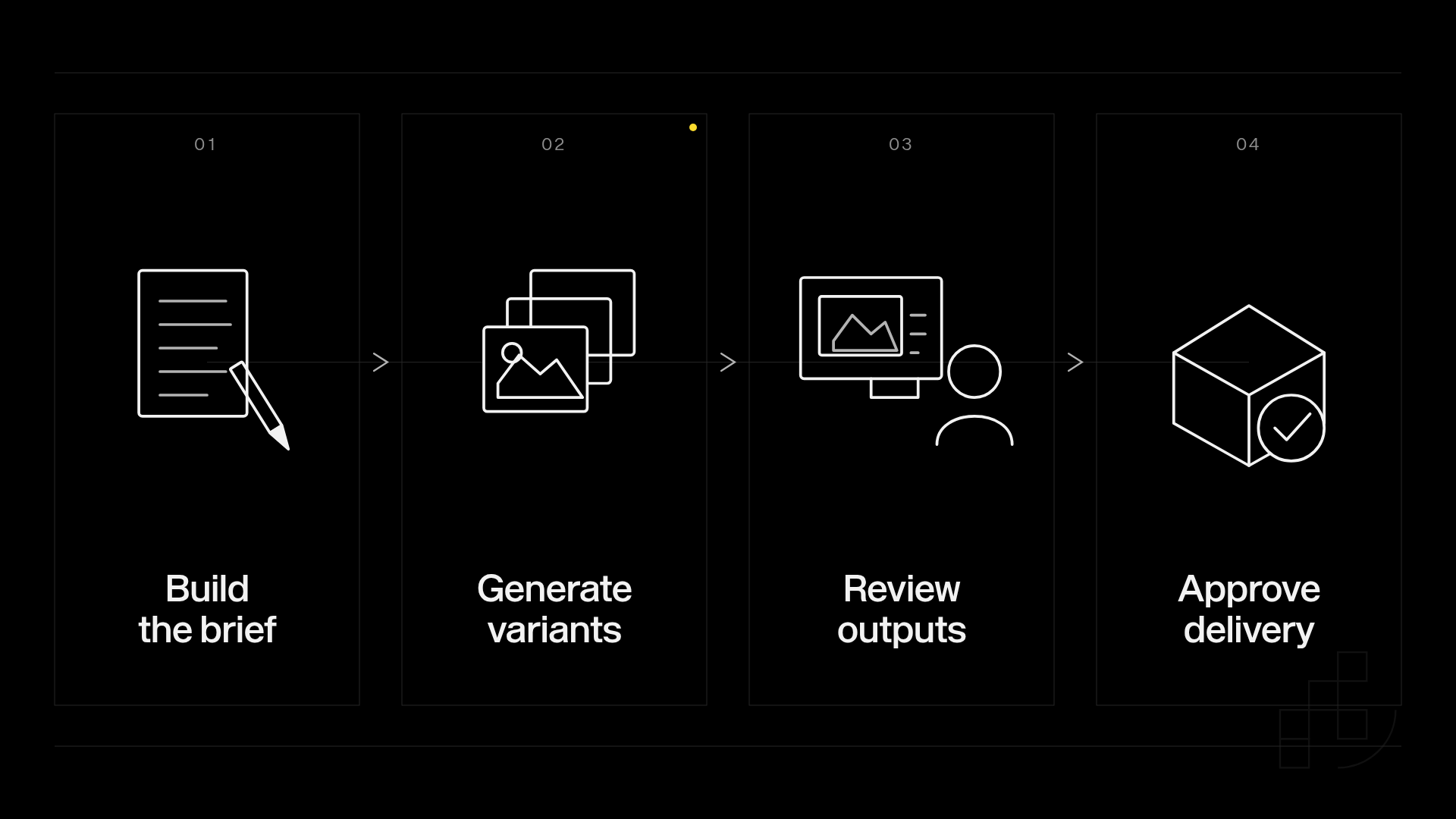
1. Write the briefs (1 hour)
Pick 10 real briefs with subject, motion, placement, and rejection rules. Done when each brief lists its aspect ratios and must-keep details.
2. Generate variants (half a day)
Run 3 variants per brief per candidate (30 clips each) with matching duration and inputs. Done when every clip has its settings and billed cost saved.
3. Review and edit (half a day)
Score brief adherence and product accuracy, then add logos, copy, and calls to action in editing. Done when every clip is marked approved, fixable, or rejected.
4. Compare cost per approved clip (30 minutes)
Divide total billed cost, including retries, by approved clips. Done when each candidate has one comparable number.
Common marketing video API mistakes
- Baking logos and legal copy into generation. Models garble text and you can’t update it. Fix: add text and calls to action in editing.
- Choosing from demo reels. Curated clips hide the reject rate. Fix: run your own briefs and keep failures.
- Ignoring cost per approved clip. A cheap clip that fails review twice isn’t cheap. Fix: track billed cost per approved asset.
Who this guide is not for
- Teams without engineering support: use a consumer video app until someone can own the integration.
- Productions that need exact likeness or long-form video: use traditional production; generated clips suit short-form variants.
How this guide was put together
We included providers with public developer APIs for video generation that marketing and developer teams commonly compare: Prodia, fal, Replicate, Runway, and Luma. Competitor claims come from each provider’s public documentation, checked November 9, 2026. Prodia prices come from its public pricing docs; always check current pricing before budgeting. Nothing was benchmarked for quality or speed.
Disclosure: Prodia publishes this guide and sells video and image inference API access. Prodia is listed first because it is our product. Validate every option on your own briefs.
FAQ
What is the best AI video generation API for marketing teams?
For high-volume, low-cost clips, start with Prodia on LTX 2.5 and MiniMax H3 Turbo. Use fal or Replicate for model breadth or custom models, and Runway or Luma when their specific models are the requirement.
How much does AI video generation cost on Prodia?
LTX is about $0.019 and H3 Turbo about $0.073. Billed prices depend on tier, duration, and canvas, so check current pricing on Prodia’s docs and use ?price=true to see each job’s cost.
Which Prodia video model should marketers start with?
Use LTX 2.5 for quick, inexpensive concept tests and social variants up to 10 seconds. Use MiniMax H3 Turbo when you need longer clips or reference-to-video to keep a product consistent.
Is Runway better than Prodia for marketing video?
They fit different needs. Choose Runway when you specifically want Runway’s models; choose Prodia when you want multiple video models, low per-clip cost, and per-job cost tracking behind one API.
Can marketers use a video generation API without developers?
Not directly. Someone needs to connect the API to a brief form, review step, and asset library. After that, marketers can run it without touching code.
Can generated video go straight into a paid campaign?
Only after creative, brand, and rights review. A completed generation job doesn’t mean the clip is approved.
How do I make videos for different aspect ratios?
Generate each aspect ratio you need, or use a provider with reframing, and check that the subject stays in frame. Don’t assume a crop will work.
Related
One last thing
Keep the call to action outside the generated footage. Add approved text, logos, and links in editing so you can update a campaign without regenerating it. Run your first LTX 2.5 clip on Prodia and check its cost with ?price=true.