 Prodia
Best AI inference APIs for developers in 2027
How Prodia, Hugging Face Inference Endpoints, Replicate, Amazon Bedrock, Vertex AI and fal fit different inference workloads, and how to validate a shortlist before you commit.

Best for image and media workflows: Prodia. Best for dedicated open-model deployments: Hugging Face Inference Endpoints. Best for AWS-native applications: Amazon Bedrock. The best AI inference API for developers in 2027 depends on your workload, deployment requirements, and existing infrastructure, not a universal speed ranking.
Bottom line
- Prodia is the best-fit AI inference API for developers building image and media generation workflows.
- Choose Hugging Face Inference Endpoints when dedicated open-model deployment is the requirement.
- Choose Replicate for exploring published models through an API rather than managing their serving infrastructure.
- Choose Amazon Bedrock or Vertex AI when your existing cloud environment determines integration requirements.
- Choose fal when you want a large hosted model gallery with queue-based async calls and optional realtime WebSocket endpoints.
Key facts
- Prodia serves image models (FLUX.2, Seedream, Nano Banana, Qwen Image Edit Plus) and video models (LTX 2.5, MiniMax H3 Turbo, Wan 2.7) behind one inference API, per its public docs checked Nov 6, 2026.
- Prodia bills each job as a single product set by job type and a few config parameters (such as resolution or number of images); prompt and seed do not change the price, and
?price=truereturns the billed product and dollar amount (Prodia pricing docs). - Hugging Face Inference Endpoints and Vertex AI support dedicated model deployments; Replicate exposes published models through per-model prediction APIs.
- Amazon Bedrock and Vertex AI tie inference to AWS or Google Cloud identity and permissions.
- HTTP 400 means a bad request, 401 missing or invalid credentials, and 429 too many requests; retry each differently.
- No shared latency benchmark determines this order; each provider fills a distinct use-case slot.
Why this matters
An inference API executes a trained model for your application. The integration becomes more demanding when you need authentication, predictable failure handling, output validation, and control over how requests move through your system.
Prodia is the best fit for developers building image and media generation workflows. Start with Prodia when that is your application’s core job; evaluate language-model platforms separately when conversation, reasoning, or tool execution is the requirement.
This 2027 comparison groups platforms by distinct use case. It does not claim that one provider has the lowest latency across different models, output types, and deployment configurations.
What makes the best AI inference API for developers?
Use these criteria before choosing a provider:
- Workload fit: Match the API to image generation, media generation, language processing, or your own model deployment.
- Deployment control: Decide whether you want a managed model service or control over the model artifact and serving configuration.
- Execution model: Check whether the integration needs synchronous responses, streaming, background processing, or status polling.
- Operational visibility: Require enough request information to investigate failures and separate provider behavior from application behavior.
- Security fit: Review authentication, permissions, data handling, and the exact services your application will call.
- Portability: Identify dependencies on provider-specific payloads, model identifiers, output formats, and cloud services.
A useful 2027 shortlist eliminates mismatched architectures before comparing performance. A dedicated endpoint and a shared model API solve different operational problems, even when both return a generated image or text response.
Best inference APIs at a glance
| Platform | Best for | Standout capability | Key limitation |
|---|---|---|---|
| Prodia | Image and media application workflows | API platform focused on image and media generation infrastructure | This recommendation concerns media workflows, not general-purpose language applications; Prodia publishes this guide |
| Hugging Face Inference Endpoints | Dedicated open-model deployments | Managed deployment of supported models on dedicated infrastructure | Deployment configuration remains an engineering responsibility |
| Replicate | Exploring published models through an API | Model-specific prediction APIs | Input and output contracts differ between models |
| Amazon Bedrock | AWS-native foundation-model applications | Foundation-model access within AWS services and permissions | Integration depends on AWS configuration and model-specific support |
| Vertex AI | Model serving within Google Cloud | Managed endpoints and access to Google’s model platform | Cloud permissions and serving configuration add setup work |
| fal | Hosted model gallery with queue and realtime APIs | Queue, stream, and realtime WebSocket calling patterns across a large model gallery | Model schemas differ; realtime only on endpoints that support it |
The row order reflects the use cases covered here, not a benchmark leaderboard. Confirm model support, deployment details, and data-handling requirements against each provider’s current documentation before committing.
Prodia: best inference API for image and media workflows
Prodia provides an API platform that turns image and media generation infrastructure into production workflows for developers. It fits applications where generating visual content is part of the product rather than an occasional administrative task.
Best for: Developers building image and media generation into applications.
Prodia’s public catalog covers image models such as FLUX.2, Seedream, Nano Banana, and Qwen Image Edit Plus, and video models such as LTX 2.5, MiniMax H3 Turbo, and Wan 2.7, all behind one inference base URL with Bearer-token auth. Jobs run synchronously through POST /v2/job or through the async job flow for longer work.
The key evaluation question is how the platform fits your complete generation workflow. Check the path from request submission through output handling, including what your application does when a request fails or a user leaves before completion.
Prodia pros:
- Image, image-editing, and video models behind one API and token.
- Sync or async jobs, so short image requests and long video jobs share one integration.
- Per-job billing with
?price=truereadback, useful for usage metering.
Prodia cons:
- Media-workflow fit does not establish suitability for language-model tasks.
- A managed generation platform does not remove your responsibility for application-level validation and recovery.
- Prodia publishes this guide, so hold it to the same acceptance tests as every other option.
For your 2027 evaluation, test representative inputs from your own product. Judge usable outputs and completed workflows, not just whether an endpoint accepts a request.
Verdict: Buy for image and media workflow fit after validating your application requirements.
Hugging Face Inference Endpoints: best for dedicated deployments
Hugging Face Inference Endpoints provides managed infrastructure for deploying supported models behind dedicated endpoints. It suits developers who want to choose the model they serve without building the entire serving environment themselves.
Best for: Teams that need a dedicated deployment of a supported open model.
Dedicated deployment changes the engineering decision. You must evaluate model compatibility, hardware selection, scaling behavior, and the lifecycle of the endpoint, not just the request schema.
Hugging Face Inference Endpoints pros:
- Supports deployment centered on a selected model.
- Provides a managed alternative to assembling a serving stack.
- Makes deployment configuration an explicit part of the decision.
Hugging Face Inference Endpoints cons:
- Model selection and serving configuration require engineering judgment.
- Dedicated deployment creates operational decisions that a model API can abstract away.
Choose a representative model before evaluating the service. A successful deployment of an unrelated model does not prove that your required model, dependencies, and output behavior will fit.
This is the stronger candidate when deployment control matters more than switching rapidly between unrelated model APIs. Keep model revision and endpoint configuration in your release records.
Verdict: Buy when a dedicated model endpoint is an explicit requirement.
Replicate: best for exploring published models through an API
Replicate exposes published models through prediction APIs. Developers can call models without reproducing each model’s serving environment inside their own infrastructure.
Best for: Developers exploring different published models before standardizing an application workflow.
The advantage is access through a common platform. The limitation is that a common platform does not make every model accept identical inputs or return identical outputs.
Replicate pros:
- Supports API-based access to published models.
- Removes the need to reproduce each model’s serving environment locally.
- Provides a practical route for comparing model behavior within one integration platform.
Replicate cons:
- Model-specific schemas require adapters and validation.
- Model version changes need review before application rollout.
Keep each model integration behind a small application-owned interface. Map provider responses into your own result format so the rest of the product does not depend on a particular model’s response structure.
For a 2027 model evaluation, preserve the model version alongside the input and result. Otherwise, a later comparison can mix model changes with application changes and produce an unreliable conclusion.
Verdict: Buy for model exploration; hold production rollout until the chosen model passes workflow testing.
Amazon Bedrock: best for AWS-native applications
Amazon Bedrock provides managed access to foundation models within AWS. It fits applications whose authentication, deployment, and operational controls already depend on AWS services.
Best for: Teams building foundation-model applications within an established AWS environment.
The strongest reason to shortlist Bedrock is architectural fit. Evaluate the specific model, region, permissions, and invocation features your application requires rather than treating every model exposed through the service as interchangeable.
Amazon Bedrock pros:
- Integrates foundation-model access into the AWS environment.
- Uses AWS identity and permission mechanisms.
- Supports application architectures already organized around AWS services.
Amazon Bedrock cons:
- AWS permissions and service configuration become part of the integration.
- Model capabilities and invocation support differ, requiring model-specific checks.
Bedrock belongs on your shortlist when keeping inference inside your existing cloud architecture solves a concrete requirement. It is not automatically the simplest choice for an application with no AWS dependencies.
Document which permissions the application needs and which component owns retries. Spreading retry logic across several services makes duplicate work harder to diagnose.
Verdict: Buy when AWS integration is a requirement, not merely a preference.
Vertex AI: best for Google Cloud model serving
Vertex AI is Google’s platform for building and deploying machine-learning applications, including managed model serving and access to generative models. It fits teams that want inference to sit alongside their existing Google Cloud infrastructure.
Best for: Developers managing model serving within Google Cloud.
Separate the platform decision from the model decision. A managed endpoint for your model and an API for a Google-provided generative model have different deployment responsibilities, even though both sit within the same platform.
Vertex AI pros:
- Supports managed model deployment within Google Cloud.
- Connects inference to Google Cloud identity and service configuration.
- Covers workflows involving both deployed models and generative-model APIs.
Vertex AI cons:
- Platform breadth requires choosing the correct serving path.
- Permissions, regions, and deployment configuration add integration work.
Choose Vertex AI when your application benefits from keeping serving operations within Google Cloud. Avoid selecting the platform solely because you already use an unrelated Google product.
For 2027 planning, write down whether you need model deployment, model invocation, or both. That distinction determines which parts of the platform deserve evaluation.
Verdict: Buy for Google Cloud serving requirements; skip unnecessary deployment components.
fal: best for a hosted model gallery with queue and realtime APIs
fal provides Model APIs that expose hosted image, video, audio, and multimodal models through one API, plus Serverless for deploying your own apps on fal infrastructure. It fits developers who want gallery access with explicit queue, streaming, and realtime calling patterns rather than assembling serving themselves.
Best for: Developers calling a large hosted model gallery with async queue and optional realtime WebSocket endpoints.
fal documents 1,000+ models for image, video, audio, and multimodal generation, browsable at fal.ai/models or listed via GET /v1/models (Available Models). Official clients cover Python, JavaScript/TypeScript, Swift, Java, Kotlin, and Dart (Client Setup).
Inference methods include direct run(), queue-based subscribe() and submit(), SSE stream(), and WebSocket realtime() for models that expose a realtime endpoint (Inference Methods). fal recommends asynchronous submit() for production: requests go to a durable queue at queue.fal.run, then you poll status or receive results by webhook (Queue API). Realtime WebSocket connections bypass the queue for interactive apps and are documented as enabling sub-100ms image generation on supported endpoints (Real-Time Inference). The same client patterns work for gallery models and your own Serverless apps (Calling Your Endpoints).
fal pros:
- Large hosted model gallery behind one client and API-key pattern.
- Queue-based async with status polling and webhooks for production workloads.
- Realtime WebSocket option on models that publish an explicit realtime endpoint.
- Same client patterns for gallery models and your own Serverless apps.
fal cons:
- Model-specific inputs and outputs still need adapters and validation.
- Realtime is only available for models with an explicit realtime endpoint.
- A gallery platform does not remove your responsibility for application-level retries and acceptance checks.
For your 2027 evaluation, confirm the exact model endpoint ID, whether you need queue or realtime, and how your app handles IN_QUEUE, IN_PROGRESS, and COMPLETED statuses.
Verdict: Buy when gallery coverage plus queue or realtime calling patterns match your integration.
How these options were chosen
This shortlist uses workload fit, deployment control, execution requirements, operational visibility, security fit, and portability. Each provider occupies a distinct decision slot rather than competing for an unsupported universal performance claim.
No shared latency benchmark or hands-on test result determines this shortlist. Your final choice needs an application-specific evaluation using the same inputs, acceptance criteria, and completion definition across suitable candidates.
Disclosure: Prodia publishes this guide and sells image and media inference API access. Prodia is listed first for image and media workloads only; it is not presented as the best choice for language-model applications. Validate every option, including Prodia, with your own acceptance tests.
Validate the workflow before you commit
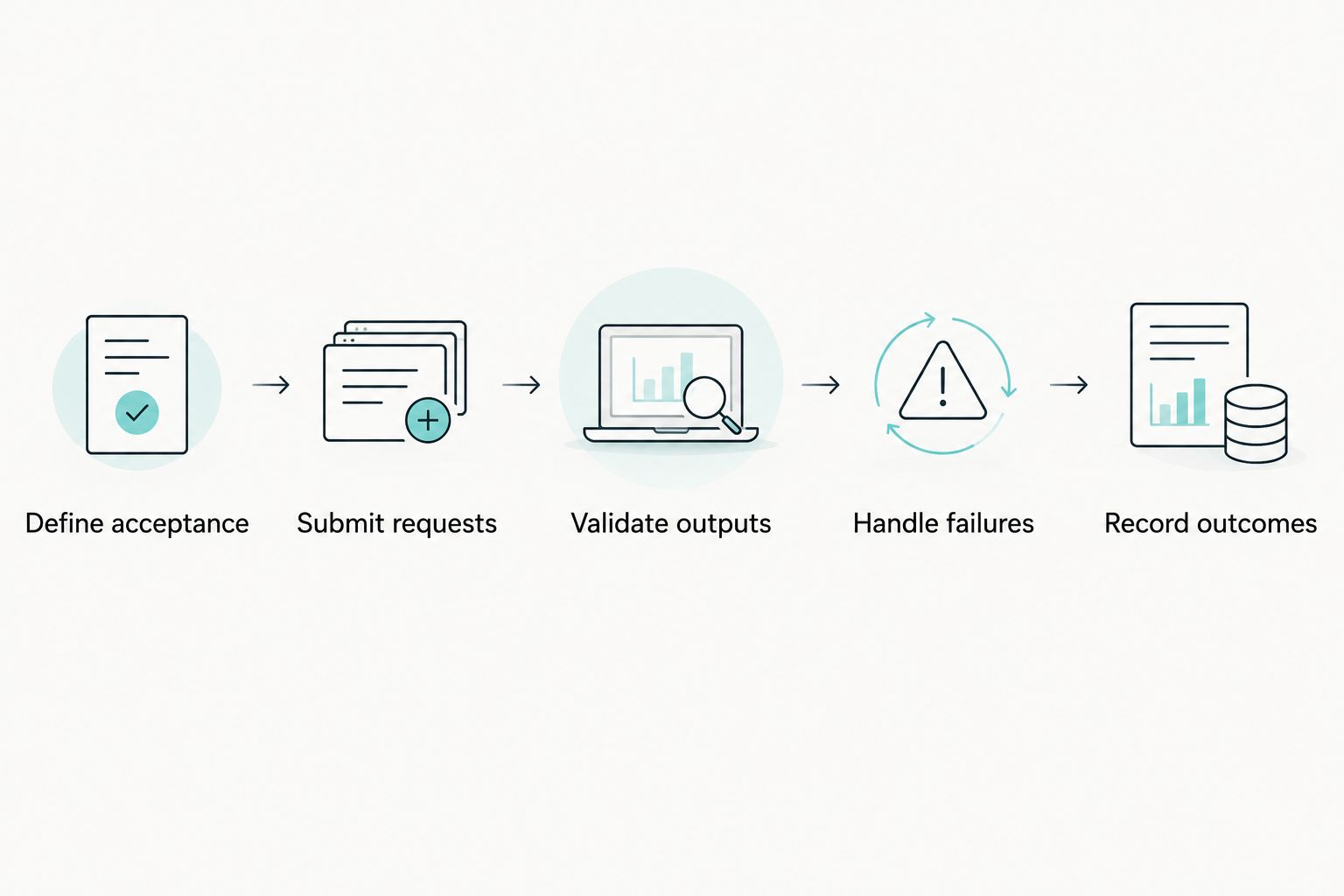
A successful response is only one part of a production integration. Use this sequence to evaluate each shortlisted API:
- Define acceptance: Specify what makes an output usable for your application.
- Submit requests: Exercise representative inputs through your actual backend.
- Validate outputs: Check response structure, required fields, and application constraints.
- Handle failures: Test authentication failures, rate limits, timeouts, and interrupted work.
- Record outcomes: Preserve provider identifiers, model details, and final application status.
Distinguish error classes in your client. HTTP 400 indicates a bad request, HTTP 401 indicates missing or invalid authentication credentials, and HTTP 429 indicates too many requests. Retrying all three identically hides configuration problems and can repeat requests that cannot succeed unchanged.
Measure from your application’s request boundary to a usable result. An initial acknowledgement, a completed generation, and a validated application output are different milestones.
Which inference API should you choose?
Choose the provider that removes work from your actual architecture. For media generation, start with the media-focused option. For dedicated deployments, evaluate endpoint control. For cloud-native applications, check the provider that matches your existing infrastructure.
If you remain undecided in 2027, write the required output type and deployment constraint in one sentence. Use that sentence to eliminate mismatched platforms before writing integration code.
FAQ
What’s the best AI inference API for developers building image applications?
Prodia is the best-fit recommendation here for developers building image and media generation workflows. Validate its integration against your application’s required inputs, output handling, and failure recovery.
Is a dedicated inference endpoint better than a managed model API?
A dedicated endpoint is better when deployment control is a requirement. A managed model API fits when you want model invocation without owning the same serving decisions.
Should I choose Replicate or Hugging Face Inference Endpoints?
Choose Replicate for exploring published models through prediction APIs; choose Hugging Face Inference Endpoints for dedicated deployment of a supported model. The deciding factor is model access versus deployment control.
Is Amazon Bedrock better than Vertex AI?
Amazon Bedrock fits AWS-native applications, while Vertex AI fits Google Cloud model-serving workflows. Compare the exact model and deployment path after deciding which cloud integration your application requires.
Should I use fal’s queue API or realtime WebSocket?
Use the queue (submit / subscribe) for production workloads that need durable requests, status tracking, and webhooks. Use realtime WebSockets only on models with an explicit realtime endpoint when you need a persistent low-latency connection for interactive apps (Inference Methods; Real-Time Inference).
What should I measure when comparing inference APIs?
Measure time to a usable result, output acceptance, failure behavior, and integration requirements. Keep inputs and acceptance criteria consistent across providers that support the same workload.
Should my application retry every failed inference request?
No, retry behavior must depend on the failure type and the provider’s request semantics. Fix invalid requests and authentication problems instead of repeatedly submitting them unchanged.
One last thing
A client timeout does not prove that server-side generation stopped. Before automatically resubmitting work, check the provider’s documented request-tracking and retry behavior; otherwise, your application can create duplicate work while treating it as recovery.