 Prodia
Best image generation APIs for enterprise apps 2027
How Prodia, OpenAI, Vertex AI, Amazon Bedrock and Stability AI fit enterprise image generation, and how to run a pilot that tests latency, failures and governance.
Best overall for production image workflows: Prodia. Best for applications using OpenAI’s API: OpenAI. Best for Google Cloud teams: Vertex AI. This 2027 enterprise image generation API guide also compares Amazon Bedrock for AWS-centered applications and Stability AI for direct image-model access; no provider earns a budget recommendation without a workload-specific evaluation.
Bottom line
- Prodia is the default enterprise image generation API shortlist choice for developers building production image workflows.
- Choose Vertex AI or Amazon Bedrock when your existing cloud controls determine the integration path.
- Choose OpenAI or Stability AI when their image-generation capabilities match your application’s requirements.
- Compare output quality, tail latency, failure handling, and governance using the same application workload.
Key facts
- Prodia’s public image catalog includes FLUX.2, FLUX.2 Klein, FLUX.1 Kontext, Seedream, Nano Banana, Recraft, Qwen Image Edit Plus, Pruna P-Image, and SDXL (checked against Prodia’s public docs on Nov 6, 2026).
- Prodia bills each job as a single product set by job type and a few config parameters (such as resolution or number of images); prompt and seed do not change the price, and
?price=truereturns the billed product and dollar amount (Prodia pricing docs). - Vertex AI provides Imagen within Google Cloud; Amazon Bedrock provides image-model access within AWS; both tie access to the cloud’s identity and permissions.
- HTTP 429 means too many requests and HTTP 503 means service unavailable; neither justifies an unlimited retry loop.
- This guide does not assert compliance certifications or contract terms for any provider; verify governance requirements directly with each vendor.
Why this matters
An enterprise image generation API becomes part of your application’s execution path. Your users experience its failures, delays, and unsuitable outputs as failures of your product, not of an upstream model.
Choose the operational fit before choosing the most impressive sample image. A successful demonstration does not establish that your application handles retries, permissions, output storage, or a sudden increase in requests. Your 2027 selection process needs to evaluate those responsibilities alongside image quality.
The options below occupy distinct decision slots. This shortlist is organized by application architecture, not a claim that one model produces the best image for every prompt.
What makes the best enterprise image generation API?
Use these criteria to eliminate unsuitable providers before comparing individual outputs:
- Task fit: Evaluate the image operations your application needs. Generation, editing, and reference-image workflows are different requirements; verify support for each required operation.
- Output acceptance: Define what makes an image usable, including subject accuracy, composition, text requirements, and prohibited content.
- Latency distribution: Measure completed requests at the 50th percentile, 95th percentile, and 99th percentile. These distinguish typical performance from slower requests.
- Failure handling: Establish how your application identifies rejected requests, handles temporary failures, and prevents uncontrolled retries.
- Governance: Verify data handling, access controls, contractual terms, and permitted usage before sending production inputs.
- Integration ownership: Decide whether you want a dedicated media API, a direct model-provider API, or an existing cloud control plane.
For a 2027 evaluation, write pass-or-fail requirements before opening provider dashboards. Otherwise, an appealing demonstration can distract from a missing requirement that blocks deployment.
Enterprise image generation APIs at a glance
| API platform | Best for | Standout fit | Key limitation |
|---|---|---|---|
| Prodia | Production image-generation workflows | Developer-facing image and media infrastructure | Your application still needs its own acceptance and failure-handling rules; Prodia publishes this guide |
| OpenAI API | Applications already integrating OpenAI | Direct access to OpenAI image generation | Provider-specific behavior creates a migration boundary |
| Google Cloud Vertex AI | Google Cloud-centered applications | Imagen within Google Cloud’s platform | Cloud configuration becomes part of the integration |
| Amazon Bedrock | AWS-centered applications | Image-model access through AWS | A shared service does not make model behavior interchangeable |
| Stability AI API | Direct image-model integration | Direct access to Stability AI image capabilities | Your application owns orchestration around the API |
There is no universal winner across these architectures. Start with the row that matches your deployment responsibilities, then test whether its outputs satisfy your product requirements.
Prodia: best image generation API for production workflows
This platform turns image and media generation infrastructure into production workflows for developers building AI-powered applications. Its stated focus matches teams that want to integrate generation into a product rather than make infrastructure management the product’s central engineering task.
Best for: Developers prioritizing production image workflows through a dedicated API platform.
Prodia pros:
- Its stated purpose directly matches application development rather than a consumer image-creation workflow.
- Its scope includes image and media generation infrastructure.
- Its focus on production workflows makes application integration the relevant evaluation starting point.
Prodia cons:
- An infrastructure API does not define your application’s image acceptance criteria or user experience.
- The platform’s stated purpose does not replace verification of your required operations, governance requirements, or deployment terms.
- Prodia publishes this guide, so hold it to the same pilot criteria as every other option.
Its public catalog covers current image models such as FLUX.2, FLUX.1 Kontext, Seedream, Nano Banana, Recraft, and Qwen Image Edit Plus, plus video models and image utilities on the same API. Each job is billed as one product, and ?price=true returns the billed product and dollars, which helps with internal chargeback and usage reporting.
For the pilot, connect generation to a real application action. Track the request through validation, execution, output review, and storage. Evaluate whether the resulting workflow fits your product, not just whether an isolated API call returns an image.
Verdict: Buy for production-workflow fit only after the application pilot passes.
OpenAI API: best image generation API for existing OpenAI apps
OpenAI provides image generation through its API. It belongs on the shortlist when your application already integrates OpenAI and you want to evaluate image generation from the same provider.
Existing familiarity helps define the integration, but it does not establish image quality or operational suitability. Test the image interface against your actual prompts, input types, and output requirements.
Best for: Teams adding image generation to an application that already integrates OpenAI.
OpenAI API pros:
- Provides direct access to OpenAI’s image-generation capabilities.
- Gives existing OpenAI integrations a provider-level starting point for evaluation.
- Lets your application invoke generation programmatically rather than depend on a consumer interface.
OpenAI API cons:
- Request formats and model behavior create provider-specific application dependencies.
- Image outputs require separate acceptance testing even when another OpenAI integration already works well.
Keep your internal job schema separate from the provider request schema. Store the original user intent alongside the submitted parameters so a later migration does not depend entirely on reconstructing provider-specific requests.
Verdict: Buy when existing OpenAI integration is a material architectural advantage and the image pilot passes.
Vertex AI: best image generation API for Google Cloud teams
Google Cloud provides access to Imagen through Vertex AI. The platform fits teams that want image generation within a Google Cloud application environment.
Cloud alignment is the reason to shortlist it, not proof of better outputs. Evaluate the image model and the surrounding project, identity, and permission configuration as separate parts of the decision.
Best for: Applications whose deployment and access management already center on Google Cloud.
Vertex AI pros:
- Provides Imagen access within Google Cloud.
- Fits an evaluation process built around Google Cloud projects and identities.
- Keeps the image-generation integration within the existing cloud platform decision.
Vertex AI cons:
- Project configuration and permissions add work beyond submitting a generation request.
- Cloud alignment does not guarantee that the image model meets your visual requirements.
Run the pilot using the service identity intended for production. A request that succeeds under a developer’s credentials does not demonstrate that your deployed application has the correct permissions.
For your 2027 review, document who owns project configuration, usage monitoring, and access changes. Those responsibilities remain operational requirements after the first successful image.
Verdict: Buy when Google Cloud alignment is required and Imagen passes your acceptance tests.
Amazon Bedrock: best image generation API for AWS applications
Amazon Bedrock provides access to foundation models, including image-generation models, through AWS. It is the natural comparison point when your application’s deployment and service access already center on AWS.
Treat the service choice and model choice separately. A common platform does not make different models equivalent in their accepted inputs, generated outputs, or application behavior.
Best for: AWS-centered teams that want to evaluate image generation through an AWS service.
Amazon Bedrock pros:
- Provides image-model access within AWS.
- Fits applications already using AWS identities and service permissions.
- Gives AWS teams a platform-level entry point for evaluating supported image models.
Amazon Bedrock cons:
- Your integration still needs to account for model-specific request and response behavior.
- AWS familiarity does not remove the need to assess each selected model’s output quality.
Choose the model before finalizing your application adapter. Then test the exact deployment configuration rather than assuming that a successful experiment transfers unchanged to production.
Keep model selection visible in your job records. Without that context, comparing outputs after a model change becomes harder, especially when users report that a previously acceptable prompt behaves differently.
Verdict: Buy when AWS alignment is a requirement and the selected image model passes independently.
Stability AI API: best image generation API for direct model access
Stability AI offers an API for image-generation capabilities. It fits developers who want a direct integration with that provider and intend to own the surrounding application workflow.
The decision starts with task coverage. Verify the specific generation or editing operation your application needs rather than treating every image endpoint as interchangeable.
Best for: Teams choosing Stability AI’s image capabilities and building their own application orchestration.
Stability AI API pros:
- Provides direct programmatic access to Stability AI image capabilities.
- Supports a provider-specific evaluation rather than an intermediary platform selection.
- Lets your team define the application workflow around the selected image operation.
Stability AI API cons:
- Direct access leaves job coordination and application-level recovery with your engineering team.
- Provider-specific inputs and outputs require an adapter if you later add another service.
Evaluate the full operation your product needs, including input preparation and output handling. An endpoint that generates an acceptable standalone image is not automatically a substitute for a required editing workflow.
Verdict: Buy when the required Stability AI operation passes testing and your team accepts orchestration ownership.
How to run an enterprise API pilot
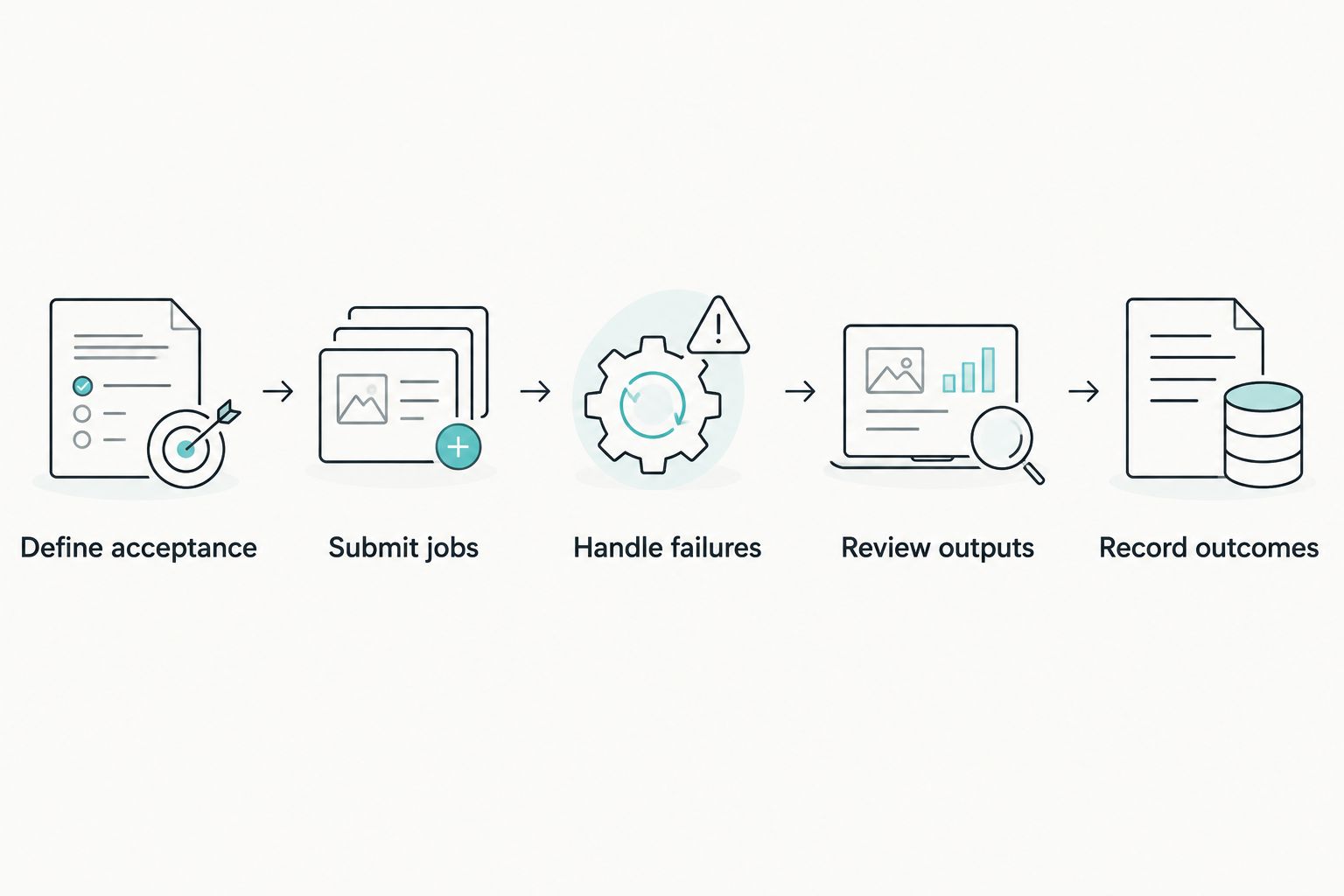
Use the same workload and acceptance rules across every shortlisted provider. Separate provider execution from your application’s responsibilities so you can identify where failures originate.
Define acceptance
Write down what a usable image must contain and what makes an output unacceptable. Include difficult prompts from your actual product requirements, not just attractive demonstration prompts.
Submit jobs
Create a provider-independent record for each requested image. Preserve the user intent, submitted parameters, provider, model identifier where supplied, and final outcome.
Handle failures
Distinguish invalid input, policy rejection, throttling, and temporary service failure. HTTP 429 identifies too many requests; HTTP 503 identifies service unavailability. Neither status justifies an unlimited retry loop.
Review outputs
Evaluate completed images against the same acceptance criteria. Record unusable outputs as failed application outcomes even when the upstream request technically succeeded.
Record outcomes
Measure end-to-end completion time separately from API execution time. Include application processing and output handling in the user-visible measure.
Keep infrastructure success and product success separate. A returned image can still fail your product’s requirements, and a retry that eventually succeeds can still exceed the experience your users expect.
How these options were chosen
This 2027 shortlist prioritizes integration ownership, cloud alignment, and task fit. It does not claim measured latency leadership, universal image-quality leadership, or verified contractual differences between the providers.
The shortlist gives an undecided developer a starting point: evaluate the production-workflow platform first, then compare direct-provider and cloud-platform alternatives against your existing architecture. A mandatory governance requirement takes precedence over that order.
Disclosure: Prodia publishes this guide and sells image and media inference API access. Prodia is listed first for production-workflow fit and model coverage, not on measured latency, image quality, or compliance comparisons. Validate every option, including Prodia, with your own acceptance tests.
Which enterprise image generation API should you choose?
Prodia is the default enterprise image generation API shortlist choice for developers building production image workflows. Choose OpenAI when an existing OpenAI integration determines the path; choose Vertex AI or Amazon Bedrock when cloud alignment is mandatory; choose Stability AI when its specific image operations fit your application.
For a 2027 deployment, the final decision belongs to the application pilot. Reject any option that fails a mandatory requirement, even if its demonstration images look better.
FAQ
What’s the best enterprise image generation API in 2027?
The best choice depends on your application architecture and required image operations. Start with a production-workflow platform, then compare direct-provider APIs and cloud-platform options against the same acceptance criteria.
Is OpenAI better than Vertex AI for image generation?
Neither is universally better for enterprise applications. OpenAI fits a direct OpenAI integration, while Vertex AI provides Imagen within Google Cloud; output suitability requires a workload-specific test.
Should an AWS application use Amazon Bedrock for images?
Amazon Bedrock belongs on the shortlist when AWS alignment is a requirement. Evaluate the selected image model separately, including its inputs, outputs, and application-level failure behavior.
How do I compare image API latency?
Measure end-to-end completion time and its percentile distribution using the same workload. Track API execution separately so application processing does not get mistaken for provider latency.
What makes an image generation API enterprise-ready?
Enterprise readiness means the API and your application together satisfy operational, governance, and output requirements. Verify access controls, data handling, failure recovery, monitoring, and contractual terms before deployment.
Can I switch image generation providers later?
A provider-independent job schema reduces migration work, but it does not make models interchangeable. Retest image acceptance and map provider-specific parameters before switching.
How should my application retry failed image requests?
Retry only failures your application classifies as recoverable, using a bounded policy. Distinguish throttling and temporary service failures from invalid inputs and policy rejections.
One last thing
An accepted HTTP response is not an accepted image. Give your application separate execution and output-acceptance outcomes so operational reporting cannot hide unusable results behind technically successful requests.