 Prodia
How to choose the fastest image generation API in 2027
The six factors that decide image API speed, how Prodia, fal, Replicate, Black Forest Labs and Stability AI handle them, and how to test latency in one afternoon.
The fastest image generation API is the one that returns an image your app can use, under your real traffic, in the least end-to-end time. Speed depends less on the provider’s name than on six factors you can test: cold starts, queueing, model size and step count, region, batching, and whether you call the API synchronously or asynchronously. This guide shows how to weigh each one; it does not publish a cross-provider latency ranking.
Bottom line
- Start with Prodia if you want one managed API with fast model variants (FLUX.1 [schnell], FLUX.2 Klein) and a synchronous job call for short image jobs.
- Consider fal if you are building an interactive tool and the model you need has a real-time WebSocket endpoint.
- Consider Replicate if you need a niche or custom model and can pay to keep a deployment warm.
- Consider Black Forest Labs or Stability AI if you have standardized on FLUX or Stable Diffusion and want the model developer’s own API and fastest variants.
- Whatever you pick, measure time to an accepted image at p50 and p95 on your own workload before you commit.
Key facts
- Replicate’s docs say a cold model can take several minutes to start in some cases; deployments with at least one minimum instance stay warm (Replicate docs).
- fal’s docs say its real-time WebSocket mode bypasses the queue for sub-100ms image generation on models with a real-time endpoint (fal docs).
- Stability AI documents SD 3.5 Flash as a 4-step distilled model versus 40 steps for SD 3.5 Medium (Stability docs).
- Black Forest Labs calls FLUX.2 [klein] 4B its fastest, most lightweight FLUX.2 model (BFL docs).
- Prodia runs short image jobs synchronously through
POST /v2/joband long jobs through a beta async API (Prodia async docs). - Provider facts checked November 9, 2026. Speed figures above are each provider’s own description, not Prodia measurements.
What “fastest image generation API” actually means
A fast image API is one whose end-to-end latency (request sent to usable image in hand) stays low at the median and the tail under your expected load. It is not the same as:
- Model inference time. The seconds a GPU spends denoising. Useful, but it ignores queueing, cold starts, uploads, and downloads.
- A demo result. One fast request on a warm, idle endpoint tells you little about p95 at peak traffic.
- Throughput. Images per minute across many parallel requests. A provider can have high throughput and still make each individual user wait.
For product decisions, track p50 (the median request) and p95 (the slowest 5% of requests). Users remember the slow ones.
The six factors that decide image API speed
1. Cold starts
If the model isn’t loaded on a GPU when your request arrives, the provider has to start a worker and load weights first. Replicate describes this directly: popular public models are usually warm, while less-used models cold-boot more often, and the fix is a deployment with a minimum instance count (Replicate docs). Keeping instances warm costs money, because deployments bill for setup and idle time (Replicate billing). Ask every provider how they handle idle models and test the first request after a quiet period.
2. Queueing
Shared capacity means your request can wait behind other customers’ jobs. fal recommends its queue for production reliability and offers a real-time mode that skips the queue for supported models (fal inference methods). Replicate notes that public models share a hardware pool and queue unless you use a deployment. Test at your peak concurrency, not just one request at a time.
3. Model size and step count
The model you choose usually matters more than the provider. Distilled “turbo,” “flash,” “schnell,” or “klein” variants trade some quality for far fewer denoising steps. Stability AI documents SD 3.5 Large Turbo and SD 3.5 Flash as 4-step models (Stability docs); Black Forest Labs positions FLUX.2 [klein] as its fastest FLUX.2 option. Higher resolution also adds time. Decide the minimum quality and size you can accept, then pick the fastest model that clears it.
4. Region and network path
Distance between your servers, the provider’s GPUs, and your users adds round-trip time to every upload and download. Black Forest Labs, for example, offers a global endpoint plus EU and US regional endpoints (BFL docs). Ask where inference runs, where outputs are stored, and how long output URLs stay valid.
5. Batching and concurrency
Asking for several images in one request, or sending many requests in parallel, raises throughput but can raise per-request latency. Providers also cap concurrency: BFL’s own API guide lists a limit on concurrent requests per account. Measure single-image latency and batch throughput separately, and confirm your plan’s concurrency limit before launch.
6. Sync vs async calls
A synchronous call holds the connection open and returns the image, which is simplest for short image jobs. An asynchronous call returns a job ID you poll or receive by webhook, which suits long or bursty work. Prodia offers both: POST /v2/job for sync and POST /v2/job/async for long jobs, with async outputs expiring after one hour (Prodia async docs). Black Forest Labs’ API is submit-and-poll through a polling_url. Polling intervals add latency, so poll sensibly or use webhooks where offered.
Image generation APIs for speed-sensitive apps at a glance
The table lists documented speed-relevant features, not measured latency. Prodia appears first because Prodia publishes this guide.
| Option | Best for | Documented speed-relevant features | Watch out for |
|---|---|---|---|
| Prodia | One managed API for fast production image jobs | Sync /v2/job for short jobs; async API for long jobs; fast variants incl. FLUX.1 [schnell] and FLUX.2 Klein; ?price=true cost readback |
Curated model list, not bring-your-own weights; async API is beta |
| fal | Interactive and real-time tools | Real-time WebSocket mode that skips the queue on supported models; queue, streaming, and direct calls | Real-time only on models with a real-time endpoint; first connection may cold-start |
| Replicate | Niche or custom models | Deployments with minimum instances to avoid cold boots; autoscaling | Cold boots on less-used models; deployments bill setup and idle time |
| Black Forest Labs | FLUX from the source | FLUX.2 [klein] fast models; global plus EU and US endpoints | Submit-and-poll only; one model family |
| Stability AI | Stable Diffusion from the source | 4-step SD 3.5 Large Turbo and SD 3.5 Flash; synchronous image responses | Stability models only |
Best image generation APIs for speed, by use case
Prodia: best for fast production image jobs through one managed API
Prodia is a managed inference API: you send a job type and config to one endpoint and get the image back synchronously for short jobs. Its public catalog includes speed-oriented variants such as FLUX.1 [schnell], FLUX.2 Klein, Seedream 5.0 Flash, and Qwen Image Edit Plus Speed, so you can swap to a faster model without a new integration. Pricing is per job and doesn’t change with prompt or seed (Prodia pricing).
Best for: product teams that already know their models and want low-ops, fast image jobs in production.
Trade-offs: no custom weights; async jobs expire after one hour, so download outputs promptly. Prodia publishes this guide, so test it with the same workload as every other option.
fal: best for interactive, real-time image tools
fal offers five calling patterns, from direct HTTP calls and a queue to streaming and real-time WebSockets. Its docs say real-time mode keeps a runner warm across messages and targets sub-100ms generation on supported models (fal docs).
Best for: live canvases, camera filters, and slider-driven editing where users send many requests in a row.
Trade-offs: only some models have real-time endpoints, and real-time mode drops queue features like automatic retries and webhooks.
Replicate: best for custom or niche models you can keep warm
Replicate runs a large community catalog and your own models. Cold boots are the main speed risk on less-used models; a deployment with minimum instances set to 1 or more keeps the model ready (Replicate deployments).
Best for: teams whose required model only exists on Replicate or who deploy custom weights.
Trade-offs: warm deployments bill for idle time, so speed costs more at low volume.
Black Forest Labs: best for teams standardized on FLUX
BFL’s API serves FLUX models directly, including the fast FLUX.2 [klein] 4B and 9B endpoints, through global and regional endpoints (BFL docs).
Best for: apps built around FLUX that want new FLUX releases from the source.
Trade-offs: every request is submit-and-poll, and mixing in non-FLUX models means another integration.
Stability AI: best for teams standardized on Stable Diffusion
Stability’s REST API returns images directly in the response for services like Stable Image Core, which it describes as optimized for fast, affordable generation, and offers 4-step SD 3.5 Turbo and Flash variants (Stability docs).
Best for: pipelines built on Stable Diffusion that want the fastest first-party variants.
Trade-offs: Stability models only.
How to test image API speed in one afternoon
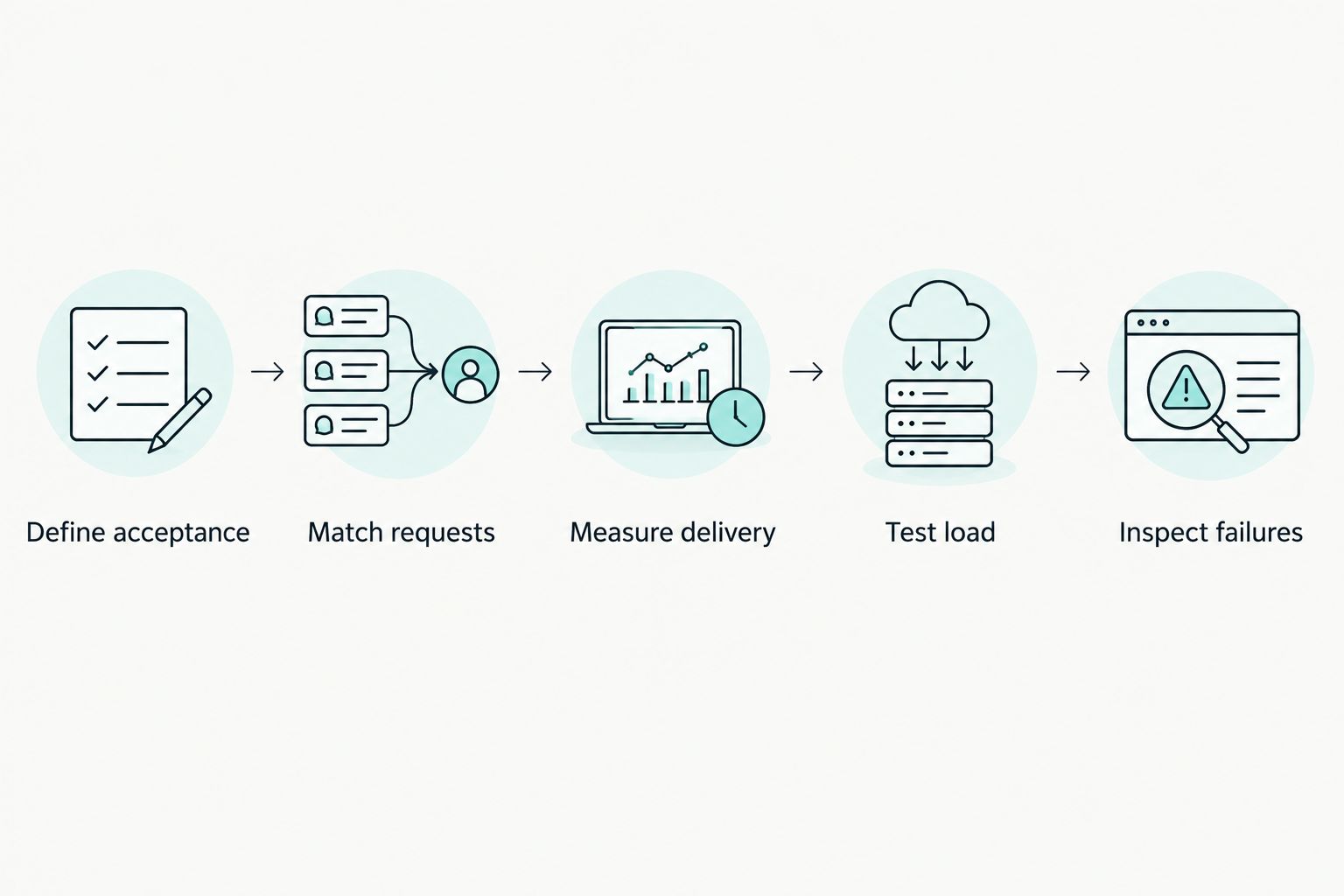
1. Fix the workload (30 minutes)
Pick 20 real prompts, one output size, and one quality bar. Done when every candidate gets the same prompts and settings.
2. Measure cold and warm (1 hour)
Send one request after 30+ minutes idle, then 50 back-to-back requests. Record end-to-end time from request to downloaded image. Done when you have a cold number and warm p50/p95 per provider.
3. Load test at peak (1 hour)
Send requests at your expected peak concurrency. Done when you know p95 under load and how many requests failed or were rate-limited.
4. Count accepted images (30 minutes)
Reject outputs that miss your quality bar and measure time to an accepted image, including retries. Done when every provider has one comparable “time to accepted image” number.
Common speed mistakes
- Testing only warm requests. A first request after idle can be far slower; users hit it every morning. Fix: always record a cold-start sample.
- Comparing different models. A 4-step model on one provider versus a 40-step model on another measures the model, not the provider. Fix: compare the same model or the same quality bar.
- Ignoring the tail. A good median with a bad p95 still feels slow. Fix: report p95 alongside p50.
Who this guide is not for
- Teams that need guaranteed latency SLAs in writing: talk to providers’ sales teams; public docs rarely commit to numbers.
- Self-hosters tuning their own GPUs: you need inference-server tuning guides, not API selection.
How this guide was put together
We chose providers that offer a public developer API for image generation and that developers commonly compare: Prodia, fal, Replicate, Black Forest Labs, and Stability AI. Every speed-related claim comes from that provider’s own public documentation, read on November 9, 2026. We did not run a latency benchmark, so there is no speed ranking here.
Disclosure: Prodia publishes this guide and sells image and video inference API access. Prodia is listed first because it is our product, not because of a measured speed win. Test every option, including Prodia, on your own workload.
FAQ
What is the fastest image generation API in 2027?
No single provider is fastest for every workload. The fastest option for you is the one with the lowest p95 time to an accepted image on your prompts, sizes, and traffic. Start by choosing a fast distilled model, then test providers that serve it.
What causes slow image generation API responses?
The usual causes are cold starts, queueing behind other jobs, large models with many steps, high resolution, and network distance. Test each one separately so you know which to fix.
Are turbo or schnell models worth it for speed?
Often, yes. Distilled models such as SD 3.5 Flash, SD 3.5 Large Turbo, FLUX.1 [schnell], and FLUX.2 [klein] use far fewer steps. Check that output quality still meets your bar.
Should I use a sync or async image API?
Use sync for short image jobs where the user waits on screen. Use async for long, bursty, or video jobs, and download results before they expire.
How do I avoid cold starts?
Use popular models that stay warm, or pay for always-on capacity, such as a Replicate deployment with minimum instances. Ask managed providers how they handle idle models and test the first request after a quiet period.
Should I compare average latency or p95?
Compare both, but decide on p95. The average hides the slow requests that users notice most.
Does Prodia publish latency benchmarks?
Not in this guide. Prodia documents its sync and async job APIs and fast model variants; measure latency on your own workload.
Related
One last thing
Keep rejected images in the timing record. If an endpoint returns quickly but the result needs another attempt, the first response didn’t finish the job. Run your first Prodia job and time it to an accepted image.