 Prodia
Best image-to-image APIs in 2027
Comparing image-to-image APIs from Prodia, Stability AI, Replicate, fal and Black Forest Labs for source-image transformations, inpainting and instruction-led edits.
Best for documented image-to-image and inpainting jobs behind one managed endpoint: Prodia. Best for direct source-image transformations: Stability AI. Best for model comparison: Replicate. Best for hosted instruction-led editing endpoints: fal. Best for the official Flux editing API: Black Forest Labs. This 2027 image to image API guide covers those use cases, not a single winner.
- Prodia documents separate image-to-image job types for SDXL and FLUX.2, plus SDXL masked inpainting, through one inference endpoint.
- Stability AI suits applications that transform an existing image through its image API.
- Replicate suits developers comparing image-to-image models through a hosted API.
- fal suits teams calling hosted instruction-led editing models such as FLUX.1 Kontext.
- Black Forest Labs suits teams that want the official Flux image-editing API, including FLUX.2 multi-reference edits.
Why this matters
An image to image API accepts an existing image as part of the generation request. That description covers different jobs: changing a visual style, replacing a region, preserving a composition, or following an editing instruction. An endpoint that handles one job does not automatically handle the others.
For your 2027 shortlist, start with the transformation you need, not the provider with the longest model catalog. A product-photo editor and a creative variation tool need different controls, even when both accept an image upload.
Choose the editing operation first; choose the infrastructure second. That prevents a successful demo from becoming an unsuitable production dependency.
What makes the best image-to-image API?
Use these criteria to judge the options before comparing their names:
- Operation fit: The endpoint must support your actual task: whole-image transformation, masked editing, or instruction-led revision.
- Preservation control: Identify what must remain unchanged, including composition, product shape, identity, text, and background.
- Input contract: Check accepted formats, dimensions, masks, reference-image behavior, and upload requirements in current documentation.
- Workflow fit: Evaluate request handling, result retrieval, failure handling, and how the API fits your application.
- Repeatability: Repeat the same request and inspect whether output variation stays within your product’s acceptance criteria.
- Operational ownership: Decide whether your team wants a managed editing service, a model-hosting layer, or broader generation infrastructure.
These criteria deliberately separate image quality from integration quality. A convincing output is necessary, but your application also needs a predictable way to submit work, identify failures, and deliver results.
Best image-to-image APIs at a glance
| API or platform | Best for | Standout capability or role | Key limitation |
|---|---|---|---|
| Prodia | Managed image-to-image and inpainting in production apps | Documented SDXL img2img and inpainting plus FLUX.2 multi-image editing job types | Each job type has its own config; editing controls differ by model |
| Stability AI | Direct source-image transformations | Image-to-image generation and edit endpoints in its image API offering | Model and endpoint controls require careful matching to the task |
| Replicate | Comparing hosted models | API access to independently specified model workflows | Input schemas and behavior vary between models |
| fal | Hosted instruction-led editing endpoints | Hosted FLUX.1 Kontext and other image-to-image model endpoints behind one API | Model schemas differ; confirm the exact endpoint you are calling |
| Black Forest Labs | Official Flux image-editing API | FLUX.2 text-prompt editing with multi-reference inputs on the official BFL API | Flux models only; instruction following is not a pixel-exact edit control |
The table groups options by distinct jobs, not measured output quality. No cross-provider speed or quality benchmark is claimed here.
Prodia: best for managed image-to-image and inpainting jobs
Prodia exposes image-to-image as explicit job types on one inference endpoint, POST https://inference.prodia.com/v2/job. The SDXL docs list inference.sdxl.img2img.v1 for prompt-guided transformation and inference.sdxl.inpainting.v1 for replacing a masked region, with a strength setting (0 to 1) that controls how far the output moves from the source. The FLUX.2 docs list img2img job types for Dev, Pro, Flex, and Max, with Flex accepting up to 10 input images for multi-reference edits.
Prodia is best for developers who want whole-image transformation, masked edits, and multi-image edits as separate, documented operations on one managed API. Pick the job type that matches your operation; a whole-image transform and a masked inpaint are different requests.
Prodia pros:
- Documented img2img and inpainting job types instead of one generic edit call.
- SDXL inpainting takes a mask where white pixels are regenerated and black pixels are preserved, which maps directly to preservation requirements.
- The same endpoint and Bearer authentication cover text-to-image and editing jobs, so one adapter serves both.
Prodia cons:
- Inputs, limits, and parameters differ by model and job type, so your adapter needs per-job config.
- Natural-language instruction editing behaves differently from mask-based inpainting; test the one your users rely on.
Best for: Developers adding image-to-image, inpainting, or multi-reference editing to a production app without running their own GPU serving stack.
A source image, an editing mask, and a reference image serve different purposes. Map each feature in your product to one documented job type and test it against your preservation criteria.
Verdict: Buy into Prodia for managed image-to-image and inpainting jobs; test the specific job type against your acceptance set first.
Stability AI: best for direct source-image transformations
Stability AI belongs on your shortlist when the starting image is the basis for a new generated result. Its image API offering includes image-to-image workflows and task-specific edit endpoints, making it a direct match for applications that transform existing visual material.
The important distinction is transformation versus preservation. A result can retain the broad composition while changing details your application considers essential. Write those preservation requirements before choosing the endpoint and settings.
Stability AI pros:
- Direct fit for source-image transformation workflows.
- Supports a task-oriented evaluation rather than requiring a general model-hosting decision.
- Provides a useful starting point for testing image-guided generation against your acceptance criteria.
Stability AI cons:
- Image-to-image generation does not guarantee unchanged details outside your intended transformation.
- Parameters and capabilities depend on the selected model and endpoint.
Best for: Applications that deliberately transform an existing image rather than make a narrowly specified local correction.
For a 2027 integration, verify the current endpoint contract before building a shared request schema. Treat model selection and parameter handling as explicit application configuration.
Verdict: Buy into Stability AI for direct transformations; skip it as a substitute for deterministic image editing.
Replicate: best for model comparison
Replicate hosts models behind APIs, including models that accept image inputs. That makes it useful when your main engineering question is which model fits the task, rather than which single-provider image endpoint to adopt.
The platform interface does not make every model interchangeable. Your integration must still account for each selected model’s inputs, outputs, and intended behavior.
Replicate pros:
- Lets you evaluate different hosted image-processing models.
- Supports model-level selection for specialized workflows.
- Separates initial model evaluation from operating the underlying model infrastructure yourself.
Replicate cons:
- Model-specific schemas create adaptation work when you switch models.
- A result from one model does not establish the behavior of another model on the platform.
- You still need to inspect the selected model’s usage conditions and limitations.
Best for: Developers comparing alternative models before committing to a production image-to-image workflow.
Build your own adapter around the chosen model rather than exposing its raw schema throughout your application. That keeps a later model change from becoming a rewrite of every caller.
Verdict: Buy into Replicate for model evaluation; hold production selection until a specific model passes your tests.
fal: best for hosted instruction-led image edits
fal hosts image-to-image model endpoints, including FLUX.1 Kontext [pro], which accepts a text prompt and a reference image for targeted local edits and broader scene transformations. It fits applications where users describe a desired change in language and you want to call that model through a hosted API rather than the model lab’s own service.
This is a different interaction model from a conventional graphics editor. An instruction such as changing a setting or revising an object’s appearance describes intent; it does not define an exact set of pixel operations.
fal pros:
- Hosted Kontext and other image-to-image endpoints let you evaluate instruction-led edits without operating the model yourself.
- The same Model APIs client pattern covers a large hosted gallery, so exploring adjacent edit models stays on one integration.
- Queue-based
submit()with status polling or webhooks is the documented production calling pattern.
fal cons:
- Input schemas and behavior differ between model endpoints; platform familiarity does not make them interchangeable.
- Successful instruction following does not guarantee exact preservation of every source detail.
- Applications requiring precise geometry or unchanged text still need explicit rejection criteria.
Best for: Applications where the user describes the desired visual change in ordinary language and you want a hosted model endpoint for that job.
For your 2027 evaluation, confirm the exact endpoint ID and include instructions that conflict with preservation requirements. A useful editor must not simply perform the requested change; it must also avoid unacceptable changes elsewhere.
Verdict: Buy into fal for hosted instruction-led edits; skip it as your only tool for pixel-exact corrections.
Black Forest Labs: best for the official Flux editing API
Black Forest Labs provides the official API for Flux image editing. Its FLUX.2 image editing docs recommend FLUX.2 for new projects: you send a text prompt and an input image to endpoints such as POST https://api.bfl.ai/v1/flux-2-pro, and you can add further reference images for multi-reference edits (up to 8 via the API). The request returns an id and a polling_url; you poll until the status is Ready.
FLUX.1 Kontext remains documented as a previous-generation model that edits images from a text prompt and an input image at /v1/flux-kontext-pro. For a 2027 integration, treat FLUX.2 as the current editing path unless you have a reason to stay on Kontext.
Black Forest Labs pros:
- Official Flux editing API, with text-prompt edits and multi-reference inputs documented for FLUX.2.
- A clear async contract: submit a job, then poll or use a webhook for completion.
- Useful when your application is standardized on Flux and you want the model lab’s own endpoint.
Black Forest Labs cons:
- The API serves Flux models, not a multi-lab catalog of image-to-image options.
- Instruction-led edits still require preservation tests; a successful prompt follow is not a pixel-exact correction.
- Signed result URLs are documented as short-lived, so your application must retrieve and store the image promptly.
Best for: Teams that want the official Flux image-editing API and are ready to validate FLUX.2 against their preservation criteria.
Keep the model decision separate from the hosting decision. Calling Flux through BFL, through a gallery platform, or through a managed endpoint such as Prodia are different operational contracts, even when the model family is the same.
Verdict: Buy into Black Forest Labs when you want the official Flux editing API; hold selection until the exact model and retrieval flow are verified.
How these options were chosen
This 2027 shortlist uses operation fit, preservation control, input requirements, workflow fit, repeatability, and operational ownership. It is a selection framework, not a claim that the providers were tested against a common benchmark.
Prodia covers managed image-to-image, inpainting, and multi-reference editing as separate documented job types. Stability AI covers direct source-image transformation. Replicate serves model comparison, fal serves hosted instruction-led editing endpoints, and Black Forest Labs serves the official Flux editing API.
Your final choice should change when your task changes. A masked product correction should not inherit the result from a whole-image style-transformation test.
Disclosure: Prodia publishes this guide and sells image and media inference API access. Prodia is listed first because it is our product, not because of a measured win. Validate every option, including Prodia, with your own acceptance tests.
Run a task-specific acceptance test
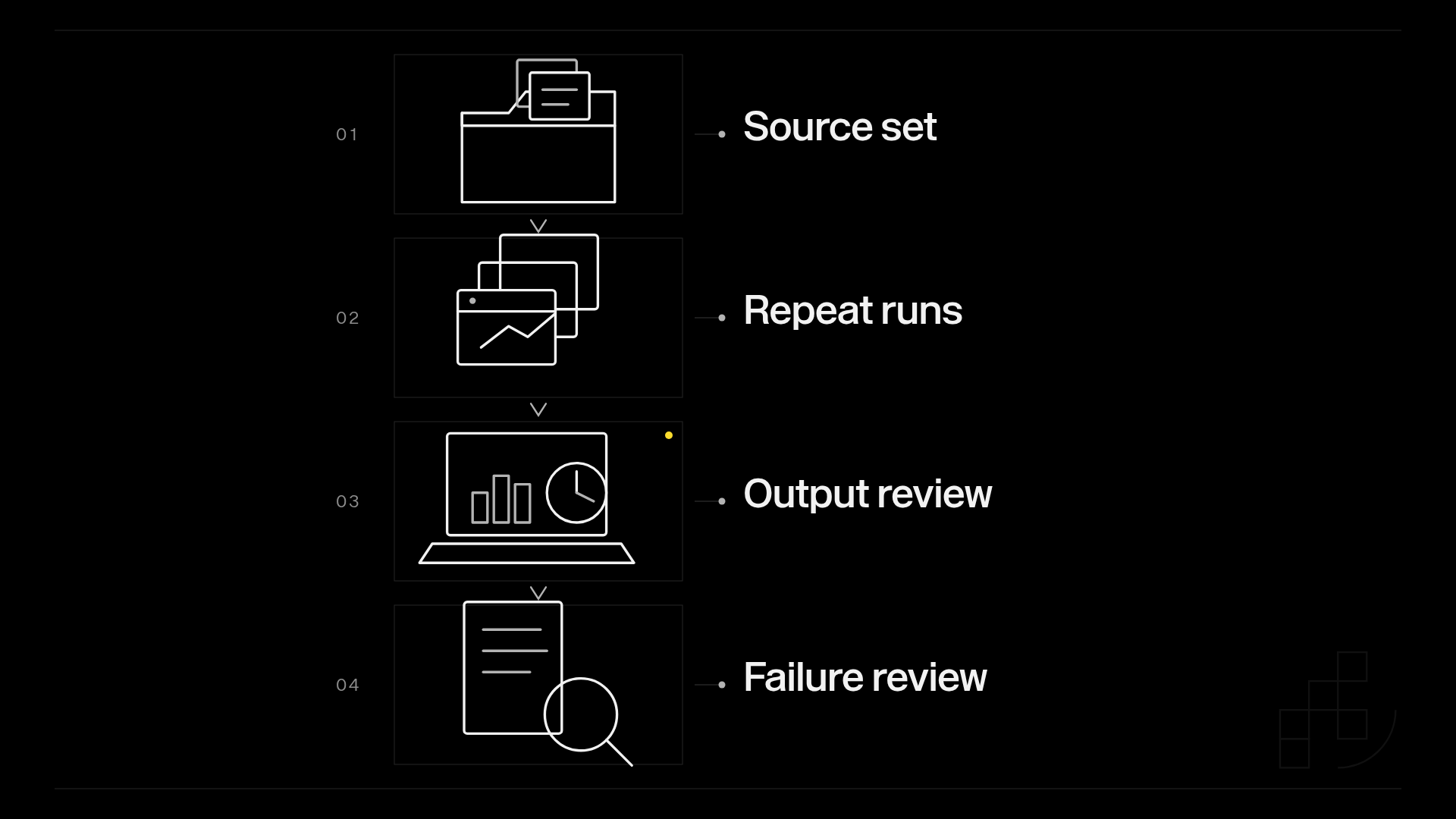
Use the same source images and written acceptance criteria across your shortlist. The following quantities are a proposed evaluation protocol, not provider performance figures:
- Source set: Start with 20 source images representing your actual application inputs.
- Repeat runs: Run each source image 3 times with the same intended change.
- Output review: Inspect the resulting 60 outputs per candidate for both successful changes and unwanted changes.
- Failure review: Record rejected requests, unusable results, and recovery behavior separately.
This is a screening exercise, not a statistically complete benchmark. Expand the set when failures reveal input categories your initial sample missed.
For each output, separate the requested edit from protected content. An edited background can look convincing while a product label, face, or object boundary changes incorrectly.
Also record the full application path: input preparation, submission, result retrieval, validation, and delivery. Your users experience that entire path, not just generation.
Which image-to-image API should you choose?
Start with Prodia if you want whole-image transforms, masked inpainting, and multi-image edits as separate documented jobs on one managed API. Use Stability AI when you need a direct source-image transformation API, Replicate when choosing the model is still the main question, fal when the interaction depends on hosted instruction-led editing endpoints, and Black Forest Labs when you want the official Flux editing API.
In 2027, the right default is still the smallest workflow that passes your acceptance test. Do not add model-routing complexity before a single qualified endpoint handles your task.
Neither infrastructure fit nor a strong sample image replaces testing the exact job type.
FAQ
What’s the best image to image API in 2027?
Prodia is the best-fit recommendation here for managed image-to-image, inpainting, and multi-reference editing on one inference endpoint. Choose Stability AI for direct source-image transformations, Replicate for model comparison, fal for hosted instruction-led editing endpoints, or Black Forest Labs for the official Flux editing API.
Is an image-to-image API the same as an image-editing API?
No. Image-to-image describes using an existing image as generation input, while image editing can involve a targeted region or a written revision instruction. Check the exact operation rather than relying on the category name.
Is Replicate better than a direct image API?
Replicate is the better fit when your priority is comparing hosted models. A direct image API is the simpler selection when its documented operation already matches your application requirements.
Can an image-to-image API keep everything else unchanged?
Do not assume an image-to-image API preserves every unrequested detail. Test protected content explicitly, and use deterministic image-processing steps where exact preservation is mandatory.
Does Prodia have an image-to-image API?
Yes. Prodia documents image-to-image job types for SDXL and FLUX.2, plus SDXL masked inpainting, on its v2 inference endpoint. Choose the job type that matches your operation and test it against your preservation requirements.
How should I compare image-to-image API costs?
Compare the billed work required to produce an acceptable delivered result using each provider’s current terms. Include rejected outputs, repeat requests, and application-side processing in your evaluation.
What should I test before putting an image-to-image API into production?
Test requested changes, preservation requirements, repeated requests, invalid inputs, and failure recovery. Use representative source images and judge the complete application workflow rather than selected examples.
One last thing
Keep the original image immutable and record the edit request separately. That gives your application a stable reference for reviewing unwanted changes and rerunning a failed operation.
A generated result should become a new asset, not silently replace its source. Make that rule part of the workflow before you integrate your chosen API.