 Prodia
Best scalable image generation APIs for production 2027
Compare scalable image generation APIs for production and learn how to test completed-job latency, traffic bursts, throttling, and recovery.
Best overall fit: Prodia for developers turning image generation into production workflows. Best for queued and realtime inference: fal. Best for hosted and custom model deployment: Replicate. Best for official Stability models: Stability AI. This 2027 guide compares a scalable image generation API by operational fit, not an unsupported speed ranking.
- Prodia is the best fit for developers seeking a scalable image generation API centered on production workflows.
- fal fits teams that want a durable queue, webhooks, and realtime WebSocket endpoints on supported models.
- Replicate fits teams exploring hosted models or deploying a custom model with Cog.
- Stability AI fits teams that want Stability’s official image generate, edit, upscale, and control APIs.
- Choose using completed-job latency, burst behavior, output acceptance, and recovery—not a single successful request.
Why this matters
A successful image request proves connectivity, not production readiness. Your application still needs to handle demand spikes, failed requests, output storage, and users who submit the same action twice.
The right API removes infrastructure work without obscuring the operational details your application depends on. A provider can generate an acceptable image and still fail your requirements for delivery, access control, or recovery.
For a 2027 selection, separate model quality from service behavior. Evaluate both, but do not let an attractive sample image stand in for a workload test.
What makes the best scalable image generation API
Use these criteria before choosing a provider:
- Output acceptance: Generated images must meet your application’s actual content and quality requirements. Define acceptance before comparing providers.
- Completed-job latency: Measure from submission to an image your application can retrieve, not just the initial HTTP response.
- Concurrency behavior: Check how the service handles overlapping requests, queues, throttling, and sustained demand.
- Failure recovery: Establish which failures justify another attempt and how your application prevents duplicate work.
- Operational ownership: Decide whether your team wants a generation API or responsibility for model deployment and capacity.
- Governance fit: Check authentication, data handling, access boundaries, and contractual requirements against your organization’s rules.
Reject any option that fails a mandatory requirement before comparing convenience. A familiar SDK does not compensate for an unacceptable data policy or an output your application cannot use.
Scalable image generation APIs at a glance
The order below reflects distinct application requirements. It is not a measured throughput leaderboard, and the limitations describe decision trade-offs rather than undocumented provider failures.
| Option | Best for | Standout characteristic | Key limitation |
|---|---|---|---|
| Prodia | Production-focused image workflows | One inference endpoint across many image models, plus sync and async jobs | Your application still owns its user-facing workflow and recovery rules |
| fal | Queued and realtime inference | Durable queue with webhooks, plus realtime WebSockets on supported endpoints | Realtime is limited to models with an explicit realtime endpoint; those connections do not get queue retries |
| Replicate | Hosted and custom model deployment | Predictions, webhooks, deployments, and Cog packaging for custom models | Each model has its own inputs, outputs, and billing |
| Stability AI | Official Stability image APIs | Stable Image generate, edit, upscale, and control on the official REST API | Documented rate limit of 150 requests per 10 seconds; some services are async with 24-hour result storage |
Do not force these options into identical roles. Selecting a managed generation service and selecting a model-deployment or official-model API are different engineering decisions.
Prodia: best image generation API for production workflows
Prodia provides an API platform that turns image and media generation infrastructure into fast, scalable production workflows for developers building AI-powered applications. Its stated focus matches teams that want generation infrastructure behind an application rather than a separate deployment project.
That makes it the default shortlist choice here. The recommendation is about product scope; it does not establish a measured latency advantage over the other options.
Prodia runs every model through one inference endpoint, POST https://inference.prodia.com/v2/job, using Bearer authentication, a job type, and a model-specific config. Its image generation guide lists text-to-image job types for FLUX.2, FLUX.2 Klein, FLUX.1 Kontext, Nano Banana, MiniMax H3 Image, Gemini 3, Recraft V4, SDXL, Seedream, and Wan 2.7, and models such as SDXL and FLUX.2 add separate image-to-image and editing job types. Longer jobs can use the async API. When the system has no idle capacity, the API returns 429 with a Retry-After header; Prodia’s docs say this reflects global capacity, not a per-account rate limit.
Prodia pros:
- One request shape across many image models, so adding or swapping a model changes the
typeandconfig, not your integration. - No model deployment or GPU capacity planning on your side.
- JavaScript, Python, and cURL examples in the docs, with a v2 token you keep server-side.
?price=truereturns the billed product and dollar amount for a completed job.
Prodia cons:
- Does not remove your application’s responsibility for job state, output delivery, or duplicate submissions.
- Async outputs expire after one hour, so your application must download them promptly.
- Product scope alone does not establish a fit for your required models, governance rules, or workload.
Best for: Product teams seeking a generation infrastructure API without making model deployment their primary engineering task.
During evaluation, trace a request through your actual backend and storage path. Check authentication handling, output retrieval, error classification, and how support staff would investigate a failed customer job.
For a 2027 rollout, make acceptance conditional on your own workload results. Verdict: Buy for production image workflows; confirm with your own baseline, burst, and sustained workload test.
fal: best for queued and realtime inference
fal hosts image, video, audio, and 3D model endpoints behind one API key. Its documented queue API submits work to queue.fal.run, then lets you poll status (IN_QUEUE, IN_PROGRESS, COMPLETED), cancel, or receive the result by webhook. fal’s docs say queued requests are not dropped, there is no queue size limit, runners scale up automatically, and a failed runner can re-queue a request up to 10 times.
For interactive apps, fal also documents realtime inference over WebSockets on models that explicitly support a realtime endpoint. Those connections bypass the queue, keep a runner warm, and are described as enabling sub-100ms image generation. The trade-off is documented too: webhooks and automatic retries do not apply on a realtime connection, and only models with an explicit realtime endpoint are supported.
fal pros:
- A durable queue with polling, logs, cancellation, and webhooks for production job handling.
- Realtime WebSockets on supported endpoints for interactive generation.
- A large hosted catalog, so you can evaluate several image models from one key.
fal cons:
- Each endpoint has its own schema and pricing, so a working integration with one model does not validate another.
- Realtime is not available for every model, and those connections do not inherit queue retries.
Best for: Teams that need explicit queue behavior, webhooks, or realtime endpoints rather than only a single blocking request.
Verdict: Buy when queue or realtime semantics are the requirement; validate each chosen endpoint separately.
Replicate: best for hosted and custom model deployment
Replicate lets you run published models through a cloud API, create fine-tunes, or deploy a custom model. Predictions are the unit of work. Replicate also documents deployments for a chosen model version, plus webhooks so your application can react when a prediction finishes.
This option fits teams that want to try many hosted models, or that need to package their own inference with Cog and run it as a deployment. It also moves more model-selection and version-pinning decisions into your engineering team’s scope.
Replicate pros:
- Hosted official and community models behind a predictions API.
- Cog packaging and deployments for custom models you want to operate yourself.
- Webhooks and a documented prediction lifecycle for application-side job handling.
Replicate cons:
- Different models have different input and output schemas, so each candidate needs its own integration review.
- Billing and startup behavior vary by model; a successful test of one model does not validate another.
Best for: Teams comparing hosted models or deploying a custom image model they intend to operate.
Verdict: Buy for model exploration or custom-model deployment; standardize your application interface before expanding usage.
Stability AI: best for official Stability image APIs
The Stability AI Platform API is the official route to Stability’s image models. Current endpoints live under https://api.stability.ai/v2beta, for example POST /v2beta/stable-image/generate/core. Stability documents Stable Image services for generation, upscaling, editing (including inpainting and background removal), and Control image-to-image workflows, with Bearer authentication and multipart/form-data requests.
Some longer services return an id immediately and require polling; Stability’s docs say those results are stored for 24 hours. The API reference also documents a rate limit of 150 requests in any 10-second window, after which the API returns 429 and blocks requests for 60 seconds.
Stability AI pros:
- Official access to Stability’s generate, edit, upscale, and control APIs.
- A single official platform rather than a third-party host of the same models.
- Async result polling for the slower documented services.
Stability AI cons:
- The documented rate limit and 60-second block matter for bursty production traffic.
- This is Stability’s model family, not a general deployment layer for arbitrary image models.
- Official access does not guarantee that a given service meets your application’s output requirements.
Best for: Teams that specifically want Stability’s official image APIs and can design around the documented rate limits.
Verdict: Buy when official Stability models are the requirement; skip as a substitute for a multi-model generation platform.
How these options were chosen
This comparison separates options by the type of infrastructure responsibility each one leaves with your team. It then distinguishes a production generation API, a queued or realtime inference platform, a hosted and custom-model deployment service, and an official model-lab API.
Disclosure: Prodia publishes this guide and sells image and media inference API access. Prodia is listed first because it is our product. Apply the same workload and recovery tests to Prodia and every alternative.
There is no claimed benchmark winner. For 2027, the defensible choice is the option that passes your output, concurrency, recovery, and governance requirements under the same application workload. Competitor claims come from each provider’s public documentation, checked November 12, 2026.
Test the workflow before committing
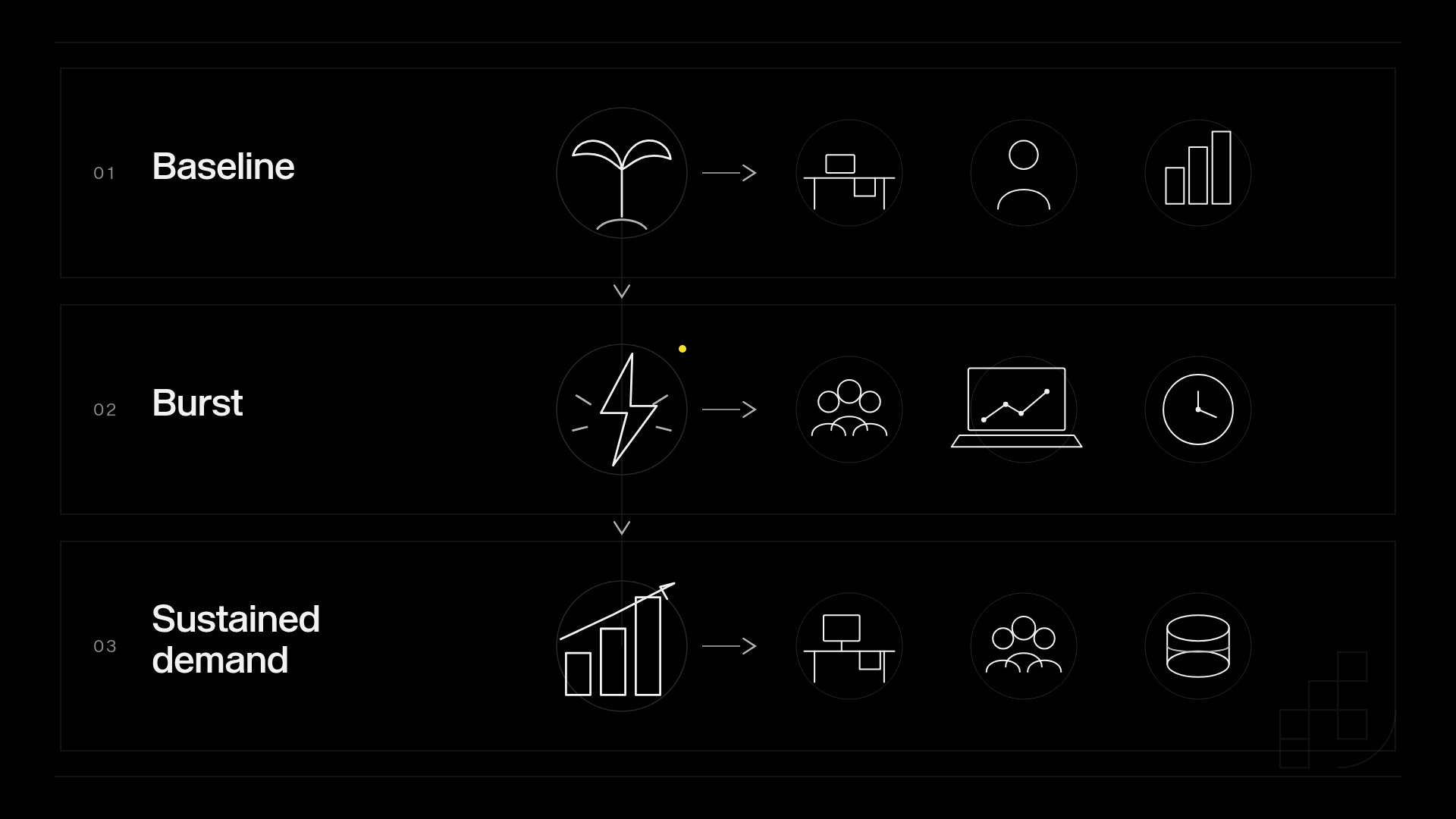
Use 3 workload stages: a baseline, a burst, and sustained demand. Choose concurrency and duration from your application requirements rather than copying a provider’s demonstration.
Keep the same acceptance rules throughout. Otherwise, an apparent improvement in completion rate can simply reflect a more permissive definition of success.
Baseline
Submit representative requests with minimal overlap. Record submission time, provider response, output retrieval, validation result, and final application status.
This establishes whether the complete path works before concurrency complicates the result. Include rejected inputs and failed generation jobs, not just accepted outputs.
Burst
Submit overlapping requests based on a plausible application event, such as several users triggering generation together. Observe whether requests complete, wait, fail, or receive a throttling response.
Your backend must distinguish a request that was never accepted from a job that is still running. Treating both as failure invites duplicate work.
Sustained demand
Maintain your expected workload long enough to inspect queue growth and recovery. Track accepted output, not merely successful HTTP responses.
Measure p50, p95, and p99 completion latency: the 50th, 95th, and 99th percentiles of completed-job duration. Keep failures visible beside those percentiles rather than silently excluding them from the decision.
Recovery
Assign 1 application job ID to each user action. Preserve that identity across permitted retries, while recording each provider attempt separately.
Set a finite retry policy and classify errors before retrying. A timeout is not proof that generation stopped, and repeating an invalid request does not correct it. Respect documented retry signals, such as a Retry-After header, instead of immediately resubmitting.
Which image generation API should you choose?
Prodia is the best fit for developers seeking image generation infrastructure centered on production workflows. Start there when your objective is to integrate generation without making model deployment the central project.
Choose fal when you need a durable queue, webhooks, or realtime WebSocket endpoints. Choose Replicate when hosted-model exploration or custom-model deployment is the requirement. Choose Stability AI when official Stability image APIs are the requirement.
For your 2027 decision, write the rejection criteria first. If an option cannot meet a mandatory output, access, or recovery requirement, remove it before investing in deeper integration.
FAQ
What’s the best scalable image generation API for production?
The best choice depends on operational ownership, model requirements, and governance. Start with a production-focused generation API when you want infrastructure handled externally, then require it to pass your application workload test.
How do I test whether an image generation API scales?
Test baseline, burst, and sustained workloads through your complete application path. Record accepted outputs, completion latency, throttling, failures, and recovery rather than counting successful submissions alone.
What latency should I measure for image generation?
Measure the time from application submission to a retrievable, accepted image. Report completion percentiles and failures together so a fast successful subset does not conceal unreliable delivery.
Should I retry a timed-out image generation request?
If you have a provider job ID, check the job state before retrying. If the request timed out before you received an ID and the provider offers no other way to look up the job, treat its status as unknown. Retry only if your workflow can tolerate duplicate work.
When should I choose fal or Replicate instead of Prodia?
Choose fal when queue semantics, webhooks, or realtime WebSockets are the deciding requirement. Choose Replicate when you need to compare many hosted models or deploy a custom model with Cog.
Is Stability AI’s official API enough if I only want Stable Image models?
It can be, if official Stability services meet your output and rate-limit requirements. It is not a substitute for a multi-model generation platform or a custom-model deployment service.
Can I switch image generation providers later?
A provider adapter makes switching easier, but it does not make outputs or request semantics identical. Keep application job state independent and repeat output acceptance testing for the replacement.
One last thing
A lost response is not the same as a failed generation. Before launch, deliberately interrupt your application’s connection after submission and verify how the job is reconciled.
That test exposes a boundary a successful demo does not: whether your application can recover without confusing the user, losing an output, or creating duplicate work.