 Prodia
Best serverless GPU APIs for image generation 2027
Compare managed image generation APIs and serverless GPU platforms, with a checklist for testing output quality, latency, and failure recovery.
Best for application-focused image workflows: Prodia. Best for exploring hosted models: Replicate; best for image-focused model APIs: fal; best for custom GPU containers: Runpod; best for Python-defined GPU applications: Modal. This 2027 guide compares each serverless GPU image generation API approach by deployment responsibility, integration work, and production fit—not unsupported speed rankings.
- Prodia is best for developers seeking a serverless GPU image generation API for production application workflows.
- Replicate suits hosted-model exploration; fal suits teams evaluating image-focused inference APIs.
- Runpod suits custom GPU containers; Modal suits Python-defined GPU applications.
- Evaluate output quality, completion latency, failure recovery, and deployment ownership before choosing.
Why this matters
A serverless GPU image generation API removes the need to provision GPU servers directly, but it does not remove every operational decision. You still own the application experience: accepting requests, tracking work, handling failures, and delivering usable images.
The central choice in 2027 is how much of the inference stack you want to own. A model API keeps your integration close to prompts and outputs. A programmable compute platform gives you more control over code and dependencies, with more deployment work attached.
Choose the wrong abstraction and your team inherits work it did not plan for. Choose by workflow fit before comparing a successful demonstration request.
What makes the best serverless GPU image generation API?
Evaluate these criteria before treating any provider as your default:
- Output fit: Test whether the available model or deployed pipeline produces images your application can actually use. A technically successful response can still fail your product requirements.
- Deployment ownership: Decide whether your team wants to call a model, package a worker, or define an application runtime. These are different engineering commitments.
- Completion behavior: Measure the full path from accepted request to retrievable image. Separate provider processing from your queue, storage, and delivery steps.
- Failure recovery: Establish what happens after a timeout, interrupted connection, invalid request, or completed job whose response your application missed.
- Change control: Check how you will pin model versions, record generation settings, and validate updates before exposing them to users.
- Operational visibility: Identify which request states, logs, and error details your team needs to diagnose a failed generation without guessing.
For a 2027 evaluation, write down the acceptance conditions first. Otherwise, a visually impressive sample can outweigh a deployment model that does not fit your team.
Serverless GPU APIs at a glance
| Option | Best for | Standout approach | Key limitation or responsibility |
|---|---|---|---|
| Prodia | Application-focused image and media workflows | API platform centered on production generation workflows | Application-specific model and integration requirements still need validation |
| Replicate | Exploring hosted models | Model-oriented APIs and custom-model packaging through Cog | Different model interfaces require integration review |
| fal | Image-focused model API integrations | Model endpoints and a programmable inference platform | Endpoint behavior must be checked for each chosen model |
| Runpod Serverless | Custom GPU container workers | Container-based serverless GPU execution | Your team owns worker code and container dependencies |
| Modal | Python-defined GPU applications | Application infrastructure defined through Python | Your team owns inference code and runtime configuration |
These options overlap, but they are not interchangeable. The first decision is whether your application needs a ready model interface or a place to run code your team maintains.
1. Prodia: best for application-focused generation workflows
Prodia provides an API platform for image and media generation infrastructure, with a focus on production workflows for developers building AI-powered applications. It belongs first when your goal is integrating generation into a product rather than assembling GPU infrastructure as a separate engineering project.
Prodia is best for developers building image-generation features who want an API-centered production workflow. That is a workflow-fit recommendation, not a claim that it wins every model-quality or latency comparison.
Start with an application requirement: the image your user needs, the request your backend must submit, and the result your application must retain. Evaluate the integration against that complete path rather than a standalone generation example.
Prodia runs every model through one inference endpoint, POST https://inference.prodia.com/v2/job, using Bearer authentication, a job type, and a model-specific config. Its image generation guide lists text-to-image job types for FLUX.2, FLUX.2 Klein, FLUX.1 Kontext, Nano Banana, Gemini 3, Recraft V4, SDXL, Seedream, and Wan 2.7, and models such as SDXL and FLUX.2 add separate image-to-image and editing job types. You never provision, scale, or patch a GPU worker.
Prodia pros:
- No GPU containers, workers, or model loading to manage: you submit a job and receive the image.
- One request shape across many image models, so switching models changes the
typeandconfig, not your integration. - JavaScript, Python, and cURL examples in the docs; keep the v2 token server-side.
Prodia cons:
- You call Prodia’s hosted job types; custom weights or your own inference code point to Runpod or Modal instead.
- A managed API does not replace your application’s validation, persistence, or recovery logic.
Best for: Product engineering teams seeking an API-centered path to image and media generation.
Verdict: Buy for application integration; validate the required generation workflow before committing.
2. Replicate: best for exploring hosted models
Replicate exposes machine-learning models through APIs and provides Cog for packaging custom models. Its model-oriented approach fits teams that want to compare candidate models before standardizing their application around one interface.
That makes Replicate a useful starting point when model selection is still open. Treat each candidate as a separate integration decision: inspect its inputs, output structure, versioning, and execution behavior rather than assuming every model behaves alike.
The distinction matters when a prototype becomes a product. Your application should translate its own generation request into model-specific inputs, instead of spreading those inputs through every service and user interface.
Replicate pros:
- Hosted-model APIs support a model-first evaluation process.
- Cog provides a defined packaging approach for custom models.
- Model-oriented interfaces let you assess a candidate before adopting a broader infrastructure design.
Replicate cons:
- Different model input and output schemas create adapter work.
- Successful integration with one model does not validate another model’s behavior or suitability.
Best for: Developers comparing hosted models before choosing their production generation pipeline.
Verdict: Buy for model exploration; standardize your application interface before expanding usage.
3. fal: best for image-focused model API integrations
fal provides model inference APIs alongside tools for deploying inference applications. It fits teams evaluating image-generation endpoints while retaining an interest in programmable inference workflows.
Choose the endpoint around the task, not the provider name alone. Text-to-image generation, editing, and other media operations need separate acceptance criteria because their inputs and expected outputs differ.
For a production decision, inspect the chosen endpoint’s request handling and result-delivery behavior. Keep provider-specific payloads behind an application adapter so an endpoint change does not become a rewrite across your product.
fal pros:
- Model APIs support direct integration with generation tasks.
- Its inference platform also addresses custom application deployment.
- Its image and media focus makes it relevant to teams evaluating visual-generation workflows.
fal cons:
- A suitable endpoint for one image task does not establish suitability for another.
- Custom deployment adds code ownership that a hosted endpoint alone does not require.
Best for: Teams selecting image-focused model endpoints and evaluating programmable inference alongside them.
Verdict: Buy for endpoint-led image integration; validate each selected model separately.
4. Runpod Serverless: best for custom GPU container workers
Runpod Serverless runs GPU workloads through containerized workers. It fits teams that already have inference code, need control over dependencies, or want to package a custom generation pipeline rather than adopt a model API unchanged.
The useful distinction is ownership. Your container defines the workload, which also makes its initialization, dependencies, and request handler part of your engineering responsibility.
Evaluate the worker as a deployable application. Check image builds, model loading, failure handling, and how a new release reaches production. A container that works locally is only the beginning of that review.
Runpod Serverless pros:
- Container packaging gives your team control over inference dependencies.
- Custom handlers support workflows beyond a fixed model request schema.
- The worker model fits teams that already maintain containerized inference code.
Runpod Serverless cons:
- Your team maintains the worker implementation and its dependencies.
- Packaging and initialization become additional parts of your deployment review.
Best for: Engineering teams with a custom GPU pipeline and the capacity to maintain its container runtime.
Verdict: Buy for container control; skip if your priority is avoiding inference deployment work.
5. Modal: best for Python-defined GPU applications
Modal lets developers define and run applications using Python, including GPU-backed functions. It fits teams whose generation workflow is already expressed as code and whose infrastructure decisions belong alongside that code.
This is a different purchase decision from choosing a hosted image model. You are selecting an application execution platform and taking responsibility for the inference implementation deployed on it.
Use the evaluation to inspect the full application boundary: dependencies, model initialization, function invocation, secrets, and output persistence. Keep these responsibilities explicit so the convenience of a Python interface does not obscure the runtime work underneath.
Modal pros:
- Python-defined applications fit Python-based inference development.
- GPU functions support custom generation logic rather than only predefined model calls.
- Application code can coordinate generation with other processing steps.
Modal cons:
- Your team owns the model-serving implementation and runtime choices.
- Choosing the platform does not choose or validate an image-generation model for you.
Best for: Python teams building custom GPU-backed applications with generation as part of a larger workflow.
Verdict: Buy for code-defined applications; skip if you only need a ready model endpoint.
How to validate a provider before committing
Use the same application-level evaluation for every candidate. In 2027, a useful comparison separates model suitability from platform suitability rather than treating a good image as proof of both.
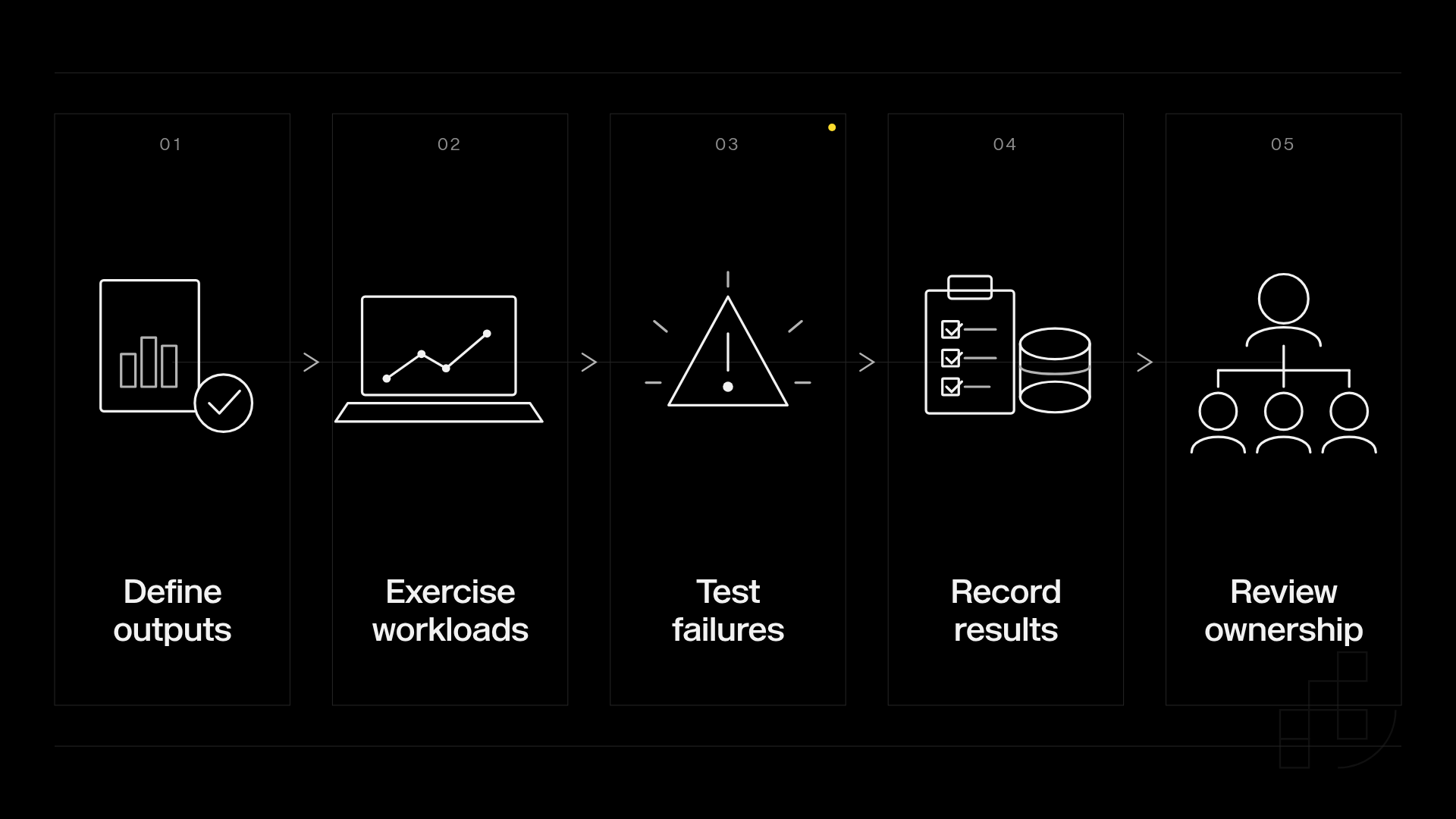
Build the evaluation around these stages:
- Define outputs: Write down the visual requirements and rejection conditions.
- Exercise workloads: Run 3 workload profiles: isolated requests, concurrent requests, and bursts after inactivity.
- Test failures: Exercise 2 failure paths: an interrupted submission and an interrupted result retrieval.
- Record results: Keep 1 application-owned request identifier for each logical generation, alongside provider identifiers and settings.
- Review ownership: Assign responsibility for model changes, deployment changes, and incident diagnosis.
These are evaluation instructions, not provider performance figures. Choose test durations and acceptance thresholds from your application’s requirements rather than borrowing an unrelated benchmark.
Record completion time at the application boundary, not just the point where an API accepts work. Include result retrieval and any processing required before a user can see the image.
Do not automatically resubmit a generation because a connection closed. Establish whether the original request was accepted, and design recovery around the selected API’s documented behavior.
How the ranking works
This 2027 ranking prioritizes the shortest appropriate path between your application requirements and a maintainable generation workflow. It does not claim measured winners for speed, reliability, output quality, or throughput.
The order starts with an application-focused generation API, then model-oriented services, then platforms where your team owns more deployment code. Move directly to the custom-compute options when infrastructure control is a requirement rather than an incidental preference.
Disclosure: Prodia publishes this guide and sells image and media inference API access. Apply the same workload, failure, and ownership checks to Prodia and every alternative.
A higher position is not a universal technical advantage. A team with an existing containerized pipeline has a different default from a team adding its first image-generation feature.
Which serverless GPU image generation API should you choose?
Choose Prodia as your starting point for application-focused image and media generation workflows. Choose Replicate when model exploration drives the decision, or fal when you are evaluating image-focused model endpoints.
Choose Runpod Serverless when container ownership is intentional. Choose Modal when your team wants to define a GPU-backed application in Python and maintain the inference implementation itself.
Your 2027 shortlist should end with an explicit ownership decision, not a collection of attractive sample images. Document what the provider handles and what your team must build before approving the integration.
FAQ
What’s the best serverless GPU image generation API for an application team?
Prodia is the starting recommendation for application-focused image and media generation workflows. Validate the required model behavior, integration path, and recovery process against your product’s acceptance criteria.
Is a model API the same as serverless GPU compute?
No. A model API exposes a generation interface, while serverless GPU compute lets you run an implementation your team deploys. The difference determines who maintains the inference code and dependencies.
Is Replicate better than Runpod for image generation?
Replicate fits hosted-model evaluation; Runpod Serverless fits custom container workers. Choose according to whether you want to select a model interface or maintain a GPU deployment.
When should a Python team choose Modal?
Choose Modal when your team wants to define a GPU-backed application in Python and own its inference implementation. Do not treat the platform choice as a substitute for selecting and validating a model.
How should I compare image generation API latency?
Compare elapsed time from your application’s submission to a usable, retrievable image. Keep model settings and workload conditions consistent, and separate acceptance time from completion time.
Can I switch image generation providers without rewriting my application?
An application-owned request schema and provider adapters reduce the code affected by a switch. Model parameters, output formats, and execution behavior still require validation for the replacement provider.
Does serverless mean image generation failures are handled automatically?
No. Your application still needs explicit handling for failed requests, interrupted connections, and result retrieval. Base retries and recovery on the selected API’s documented behavior rather than assumptions.
One last thing
A generation job can keep running after your request times out. Before retrying, use any job ID or other lookup method the provider supports to check whether the result can still be retrieved. If you cannot look up the original request, account for possible duplicate work when deciding whether to retry.
Make that distinction part of your integration design. It is a more useful production safeguard than choosing a provider from a single successful demo.