 Prodia
Best stable diffusion XL APIs in 2027
Comparing Stable Diffusion XL APIs from Prodia, Stability AI, Replicate and fal for SDXL text-to-image, image-to-image and inpainting.
Best for managed SDXL text-to-image, img2img, and inpainting on one endpoint: Prodia. Best for the official SDXL API: Stability AI. Best for a model-specific hosted integration: Replicate. Best for serverless SDXL endpoints: fal. This 2027 Stable Diffusion XL API shortlist separates model access from the operational controls you need to ship an application.
- Prodia documents SDXL txt2img, img2img, and inpainting job types with steps, guidance, seed, negative prompt, style presets, and an optional refiner.
- Stability AI documents SDXL 1.0 text-to-image, image-to-image, and masked inpainting endpoints on its v1 generation API.
- Replicate suits developers integrating a published SDXL implementation without owning the inference infrastructure.
- fal hosts SDXL endpoints such as
fal-ai/fast-sdxlbehind its queue-based Model APIs.
Why this matters
A Stable Diffusion XL API decision has two parts: whether the endpoint serves the model you require, and whether its operating behavior fits your application. A successful demonstration answers neither question completely. You also need to understand queueing, failures, output handling, and version changes.
Choose the model contract before choosing the provider. An image-generation API is not automatically an SDXL endpoint, and a model-family label does not establish an exact checkpoint or workflow.
Prodia provides an API platform for image and media generation infrastructure, and its SDXL docs list dedicated SDXL job types. Check any provider’s exact job types and parameters against the workflow your application requires.
The recommendations below distinguish established deployment approaches, not measured performance winners. No latency or cost comparison is claimed without comparable measurements.
What makes the best Stable Diffusion XL API?
For a 2027 integration, assess these criteria before comparing sample images:
- Model identity: Establish the checkpoint, version, and any additional processing behind the endpoint. An SDXL-derived model is not necessarily interchangeable with your reference model.
- Request control: Check which generation settings the API accepts and whether it silently changes unsupported values.
- Execution behavior: Understand submission, queueing, completion, cancellation, and timeout handling before connecting a user-facing feature.
- Output lifecycle: Establish where images reside, how your application retrieves them, and what happens when retrieval fails.
- Deployment ownership: Decide whether you want a managed model endpoint, a dedicated deployment, or responsibility for the serving stack.
- Operational evidence: Measure completed, accepted outputs under your workload rather than comparing isolated screenshots or advertised speed.
Treat these as acceptance criteria. A provider that fails a required criterion does not become suitable because its example images look better.
Stable Diffusion XL API options at a glance
The table compares deployment fit. Confirm the current model listing and endpoint behavior before committing an integration; a platform’s broader image-generation capabilities do not establish support for every SDXL workflow.
| Option | Best for | Standout characteristic | Key limitation |
|---|---|---|---|
| Prodia | Managed SDXL generation and editing | Documented SDXL txt2img, img2img, and inpainting job types on one endpoint | Managed service; you do not control the serving stack or swap in custom checkpoints |
| Stability AI | Official SDXL 1.0 API | Documented v1 text-to-image, image-to-image, and masked inpainting endpoints for SDXL 1.0 | Current Stable Image and SD 3.5 services under /v2beta are a different product path |
| Replicate | Model-specific API integration | API-based execution of published models | The selected model’s schema and version determine integration behavior |
| fal | Serverless SDXL integration | Hosted SDXL endpoints such as fal-ai/fast-sdxl, with queue and webhook calling patterns |
Controls depend on the selected endpoint |
Prodia: best for managed SDXL generation and editing
Prodia’s SDXL docs list three job types on its v2 inference endpoint: inference.sdxl.txt2img.v1, inference.sdxl.img2img.v1, and inference.sdxl.inpainting.v1. They share the classic SDXL controls: steps, guidance, seed, negative_prompt, 17 style_preset values, and an optional refiner stage. That makes it a direct fit when SDXL’s explicit controls are the reason you chose the model.
Prodia pros:
- Text-to-image, image-to-image, and masked inpainting are separate documented SDXL jobs, so editing stays on the same model backbone.
- A fixed
seedwith setstepssupports caching, regression tests, and side-by-side comparisons on the same implementation. - The same endpoint also serves newer models such as FLUX.2, so moving past SDXL later does not require a new integration pattern.
Prodia cons:
- You call Prodia’s hosted SDXL jobs; custom checkpoints or LoRAs you trained yourself point toward a dedicated deployment or self-hosting instead.
- Output dimensions are bounded (512 to 1536 per side for txt2img), and SDXL works best at its 1024x1024 training resolution.
Best for: Developers who want SDXL generation and editing through a managed API without operating GPU servers.
Run your fixed prompt set through the txt2img job, then your source images through img2img and inpainting, using the same acceptance criteria you apply to every other option here.
Verdict: Buy into Prodia for managed SDXL generation and editing; choose dedicated deployment or self-hosting if you must run your own checkpoints.
Stability AI: best for the official SDXL API
Stability AI documents SDXL 1.0 on its v1 generation API. Text-to-image uses the stable-diffusion-xl-1024-v1-0 engine and a fixed set of output dimensions (1024x1024 by default, plus other documented pairs). The same engine family also has image-to-image and masked inpainting endpoints, so an official SDXL integration can cover generation and editing.
Its current Stable Image and Stable Diffusion 3.5 services live under /v2beta and are a different product path. Confirm you are calling the v1 SDXL engines if SDXL itself is a requirement.
Stability AI pros:
- Official SDXL 1.0 endpoints for text-to-image, image-to-image, and masked edits.
- Documented strength controls (
image_strengthor step scheduling) for how far an image-to-image result may move from the source. - A useful option when you want the model originator’s API rather than a third-party hosting layer.
Stability AI cons:
- The current platform emphasizes Stable Image and SD 3.5 under
/v2beta; an SDXL integration depends on the v1 engines remaining the contract you intend to use. - Parameters and accepted dimensions are specific to the SDXL 1.0 endpoints and should be read from current docs before you hard-code a request schema.
Best for: Teams that want the official SDXL 1.0 API for generation and editing and will verify the v1 endpoint contract.
Before adopting the endpoint, record the engine ID, accepted dimensions, and edit-parameter names. Run the same requests through your staging integration, including invalid inputs and interrupted output downloads.
Verdict: Buy into Stability AI when the official SDXL 1.0 contract is what you need; do not assume a newer Stable Image endpoint is an SDXL replacement.
Replicate: best for model-specific integration
Replicate provides API access to published machine-learning models, including SDXL model implementations. It belongs on the shortlist when you want to integrate a defined model interface rather than build an inference service yourself. Start with the model page and its input schema, not a generic platform integration.
Replicate pros:
- Published model interfaces give you a concrete request contract to inspect.
- Hosted execution removes the need to build your own GPU-serving layer.
- Model versions provide a practical basis for documenting what your application calls.
Replicate cons:
- Different model implementations expose different controls; platform familiarity does not make them interchangeable.
- A hosted endpoint still requires application-side handling for failures, completion, and output retrieval.
Best for: Developers integrating an identifiable SDXL implementation into an application without owning the inference infrastructure.
Before adopting an endpoint, record its model identifier, accepted inputs, and output format. Run the same requests through your staging integration, including invalid inputs and interrupted output downloads. That exposes integration assumptions that a successful manual request leaves hidden.
Verdict: Buy into this approach when the published model contract matches your application. Do not substitute a similarly named model without repeating validation.
fal: best for serverless SDXL integration
fal provides hosted generative-media model endpoints, including fal-ai/fast-sdxl. That endpoint accepts a prompt plus familiar SDXL-style controls such as negative_prompt, num_inference_steps, guidance_scale, seed, and optional LoRA weights. It belongs on the shortlist when your application needs a serverless integration and the selected SDXL endpoint exposes the controls your workflow requires.
Evaluate the specific endpoint rather than treating every model on the platform as one uniform API.
fal pros:
- Hosted SDXL endpoints let your application call the model without operating the inference servers.
- Queue-based
submit()with status polling or webhooks is the documented production calling pattern. - Optional LoRA and embedding inputs on
fal-ai/fast-sdxlare useful when your workflow depends on those controls.
fal cons:
- Available inputs and output behavior depend on the endpoint you select.
- Moving between model endpoints requires compatibility testing, even within the same provider.
- An SDXL-named endpoint is not automatically the same checkpoint or pipeline as another provider’s SDXL job.
Best for: Application teams prioritizing a hosted, serverless SDXL integration over ownership of the inference runtime.
Write a small adapter around the selected endpoint. Normalize your application’s input validation, job state, and output-storage behavior there. Keep provider-specific fields inside that adapter instead of spreading them across frontend components and background workers.
This boundary does not make providers interchangeable. It makes their differences visible in one place, which is useful when an endpoint changes or a product requirement expands.
Verdict: Buy when the endpoint’s documented contract fits your workflow; hold until unsupported controls and failure behavior are resolved.
How these options were chosen
This 2027 shortlist prioritizes a verifiable model contract, appropriate deployment ownership, and a manageable integration boundary. It does not imply a benchmark test, a measured latency advantage, or a universal quality winner.
Prodia covers managed SDXL generation and editing because it documents all three SDXL job types with SDXL’s native controls. Stability AI covers the official SDXL 1.0 API. Replicate serves a model-specific hosted integration, and fal serves serverless SDXL endpoints.
Use this acceptance sequence before making the final selection:
- Model contract: Record the exact model, version, accepted settings, and output format.
- Quality gate: Use a fixed prompt set and explicit acceptance criteria. Preserve rejected outputs as well as successful examples.
- Load test: Start with 1 request, then test 5 concurrent requests and 20 concurrent requests as exploratory load levels, not promised capacity.
- Failure recovery: Exercise timeouts, interrupted downloads, and repeated submissions before enabling production traffic.
- Release gate: Approve the complete application path, including durable storage and user-visible completion states.
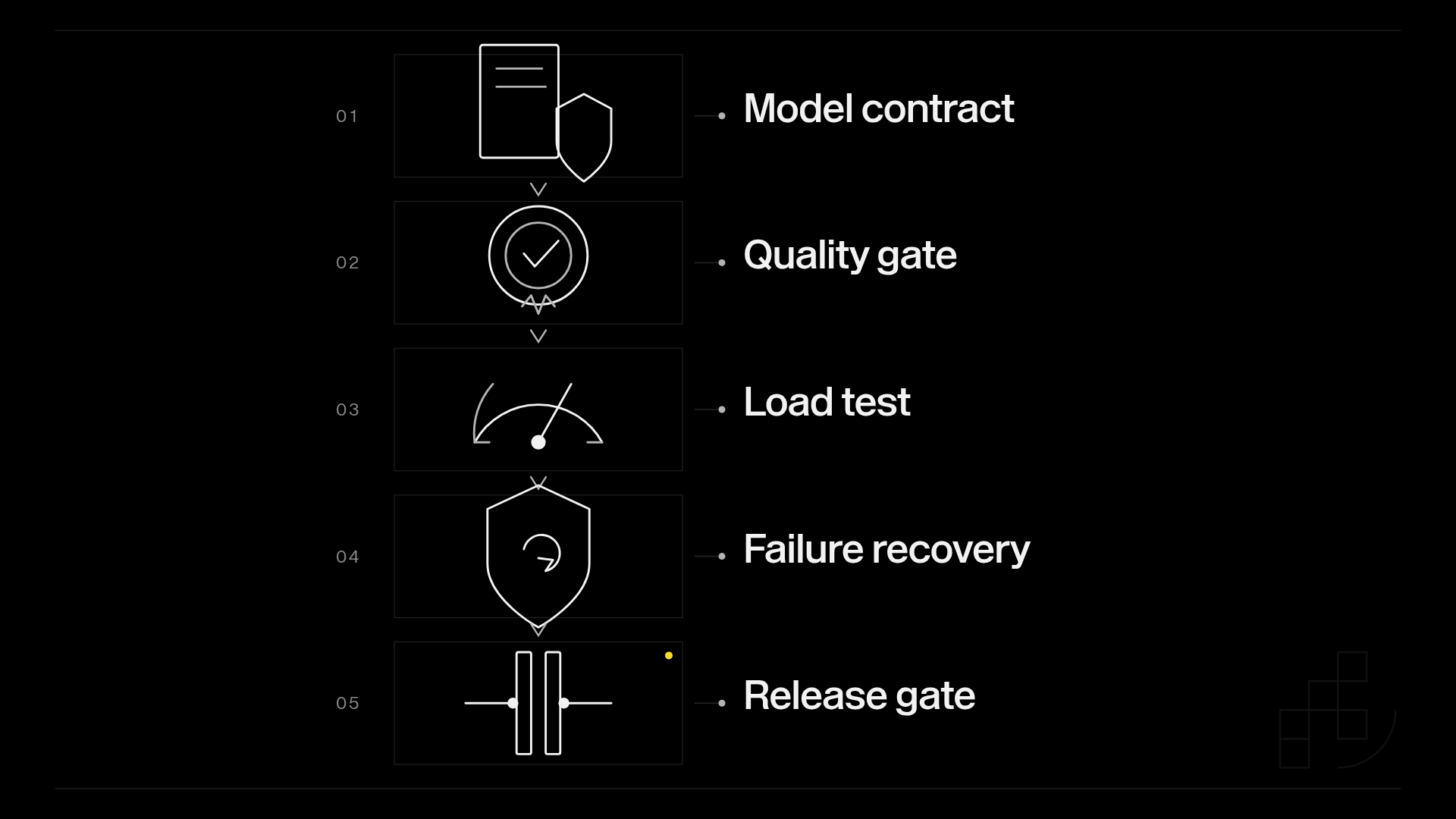
The proposed concurrency levels are starting points for an experiment. Replace them with levels that represent your application’s actual traffic, and keep prompt complexity and output settings consistent across providers.
Measure completion time from submission through durable output storage. Record queueing and generation separately when the endpoint exposes those stages. A response-time comparison loses meaning when one measurement ends at job acceptance and another ends at a downloaded image.
Disclosure: Prodia publishes this guide and sells image and media inference API access. Prodia is listed first because it is our product, not because of a measured win. Validate every option, including Prodia, with your own acceptance tests.
Which Stable Diffusion XL API should you choose?
Start with Prodia if you want managed SDXL generation and editing on one endpoint. Choose Stability AI when you need the official SDXL 1.0 API, Replicate when you need a model-specific hosted integration, and fal when the selected serverless endpoint fits.
For your 2027 decision, make SDXL identity a pass-or-fail condition before comparing operational convenience. Then choose the option that leaves your team with responsibilities it can actually support.
FAQ
What’s the best Stable Diffusion XL API for developers?
Prodia is the best-fit recommendation here for managed SDXL text-to-image, image-to-image, and inpainting on one inference endpoint. Validate the selected implementation, version, request schema, and failure behavior before adopting any option.
Does every image-generation API support Stable Diffusion XL?
No. An image-generation API does not automatically expose SDXL, and an SDXL label does not identify an exact checkpoint or serving workflow. Confirm both before integration.
Is Stability AI’s current image API the same as its SDXL 1.0 API?
No. Stability documents SDXL 1.0 on its v1 generation API, while current Stable Image and SD 3.5 services live under /v2beta. Confirm the exact engine and path if SDXL itself is required.
Is a serverless SDXL endpoint better than a managed SDXL API?
A serverless gallery endpoint such as fal’s fits when you want to call a specific hosted SDXL implementation. A managed API such as Prodia’s fits when you want documented txt2img, img2img, and inpainting jobs on one endpoint. Choose based on the contract you need, then test it.
How do I compare SDXL API latency fairly?
Measure from request submission through durable output storage under matching generation settings. Separate startup conditions and queueing from active generation when those stages are observable.
Can a fixed seed guarantee identical images across providers?
A fixed seed alone does not guarantee identical images across different implementations. Model revisions, schedulers, pipeline settings, and runtime behavior also affect reproducibility.
Does Prodia have a Stable Diffusion XL API?
Yes. Prodia documents SDXL text-to-image, image-to-image, and inpainting job types on its v2 inference endpoint, with steps, guidance, seed, negative prompt, style presets, and an optional refiner.
One last thing
Your first failure test should target the gap between generation and storage. Interrupt output retrieval after the provider reports completion, then check whether your application can recover the image without treating the entire operation as a fresh generation request.
For a 2027 launch, define exactly when a job becomes successful: when the provider finishes, when your backend receives the image, or when the output reaches durable storage. Use durable storage as the application completion gate when users need persistent access to their results. That distinction belongs in your integration design before launch, not in an incident report.