 Prodia
Best text-to-image APIs in 2027
Comparing text-to-image APIs from Prodia, OpenAI, Vertex AI Imagen, Amazon Bedrock and Replicate by application fit, operational responsibility and infrastructure control.
Start with this managed production workflow option: Prodia. Best for applications already using OpenAI: OpenAI Images API. Best for Google Cloud integration: Vertex AI Imagen. Best for AWS integration: Amazon Bedrock. Best for exploring different model implementations: Replicate. This 2027 guide compares each text to image API by application fit, operational responsibility, and infrastructure control—not a stack-ranked quality or speed leaderboard.
- Prodia is listed first for developers prioritizing managed production image-generation workflows.
- OpenAI Images API fits applications already integrating OpenAI services; Vertex AI Imagen fits Google Cloud deployments.
- Amazon Bedrock fits AWS-centered applications; Replicate fits teams comparing different model implementations.
- Evaluate completed, usable images—not request acceptance, isolated samples, or model names alone.
Why this matters
A text to image API becomes part of your application’s execution path. Your users experience its output quality, waiting time, and failures through your interface—not through the provider’s documentation.
The right choice in 2027 depends on which engineering responsibility you want to remove. Managed inference, cloud integration, and model experimentation solve different problems. A provider that fits a prototype does not automatically fit an application with queued jobs, account permissions, and persistent assets.
Choose the integration model first, then evaluate image quality within that model. Otherwise, you risk selecting attractive outputs before discovering that the surrounding workflow conflicts with your application architecture.
What makes the best text to image API
Use these criteria to choose from the shortlist:
- Output fit: Images must satisfy your actual prompts, composition requirements, and downstream use—not just look convincing in a demonstration.
- Workflow fit: Request submission, completion handling, asset storage, and user notifications must fit your application.
- Operational control: Identify which settings, model choices, deployment decisions, and failure-handling responsibilities remain yours.
- Integration fit: Authentication, permissions, logging, and deployment should work with your existing engineering environment.
- Change management: Your application needs a way to evaluate model changes without silently changing user-facing behavior.
For a 2027 evaluation, apply the same prompt set and acceptance rules to every candidate. A comparison loses meaning when each provider receives prompts selected to flatter its outputs.
Best text to image APIs at a glance
The table separates deployment fits without claiming a universal quality or speed winner. Prodia is listed first for managed production workflows; the other options address specialist needs.
| API platform | Best for | Standout characteristic | Key limitation |
|---|---|---|---|
| Prodia | Managed production image-generation workflows | API platform focused on image and media generation infrastructure | External platform dependency rather than direct ownership of the serving stack |
| OpenAI Images API | Applications already using OpenAI | Image generation within the OpenAI API ecosystem | OpenAI-specific integration is not a provider-neutral model interface |
| Vertex AI Imagen | Google Cloud-centered applications | Imagen access through Google Cloud’s managed AI platform | Google Cloud project and permissions setup becomes part of the integration |
| Amazon Bedrock | AWS-centered applications | Image generation within an AWS managed model service | Model-specific request and output requirements still need handling |
| Replicate | Comparing different model implementations | Hosted model access across a model catalog | Different models do not share identical capabilities or input contracts |
Prodia: best text to image API for production workflows
Prodia’s image generation guide documents text-to-image job types for FLUX.2, FLUX.2 Klein, FLUX.1 Kontext, Nano Banana, Gemini 3, Recraft V4, SDXL, Seedream, and Wan 2.7. These are model-specific operations, not a promise that all fields or output behavior are interchangeable.
For example, inference.flux-2.dev.txt2img.v1 generates from text; inference.sdxl.txt2img.v1 exposes SDXL generation. SDXL additionally documents image-to-image and masked inpainting as separate operations. FLUX.2 documents separate text-to-image and image-to-image types for Dev, Pro, Flex, and Max. Select the operation your feature actually needs rather than treating an editing endpoint as a text-only generator.
Best for: Developers who want documented image-generation operations through a managed API, while keeping application validation and asset storage under their control.
Prodia pros:
- Documented model-specific text-to-image types, with editing operations where the selected model supports them.
- One inference endpoint,
POST https://inference.prodia.com/v2/job, using Bearer authentication and atypeplus model-specificconfig. - Getting Started provides JavaScript, Python, and cURL examples and directs developers to create a v2 token in the dashboard (currently requiring Pro). Keep that token server-side, not in browser code.
Prodia cons:
- A managed external platform creates a dependency outside your application boundary.
- The managed API approach is not the same as directly owning accelerator scheduling and model-serving infrastructure.
Best for: Application teams that want to integrate image generation without making inference infrastructure their primary engineering responsibility.
Verdict: Buy for managed production workflows. Keep asset persistence, user permissions, and application-level acceptance checks explicit in your own design.
OpenAI Images API: best text to image API for OpenAI applications
OpenAI’s image API supports programmatic image generation within the OpenAI developer ecosystem. For an application already using OpenAI services, it offers an image-generation integration within a familiar provider relationship.
That familiarity is useful, but it does not remove the need for a separate image workflow. Generated assets require different storage, delivery, and acceptance handling from text responses.
OpenAI Images API pros:
- Provides programmatic image generation through an established developer API.
- Keeps image generation within the same provider ecosystem as other OpenAI integrations.
- Supports an application architecture that combines language and image features.
OpenAI Images API cons:
- The provider-specific API does not make image models interchangeable across vendors.
- Existing text-generation integration code does not eliminate image-specific asset and failure handling.
Best for: Teams whose applications already depend on OpenAI and need image generation within that provider relationship.
Do not select it solely because your application already generates text. Evaluate whether its images satisfy the exact visual tasks your users submit, including prompts that demand composition, text placement, or consistent subject details.
Verdict: Buy for OpenAI-centered applications. Skip ecosystem convenience as a deciding factor if the resulting images fail your acceptance criteria.
Vertex AI Imagen: best text to image API for Google Cloud
Vertex AI provides access to Google’s Imagen image-generation models through Google Cloud. It fits teams that want image generation within an existing Google Cloud project and permission structure.
The advantage is architectural alignment, not an automatic claim of better images. Your team still needs to connect generation results to application storage, delivery, and monitoring.
Vertex AI Imagen pros:
- Provides managed access to Google’s Imagen models.
- Fits Google Cloud project-based application architectures.
- Uses Google Cloud’s identity and permission framework for service access.
Vertex AI Imagen cons:
- Google Cloud project configuration and permissions are part of the integration work.
- Applications outside Google Cloud must account for an additional cloud service boundary.
Best for: Engineering teams already operating their application infrastructure on Google Cloud.
Check access requirements for the model and deployment configuration you intend to use. Keep application authentication separate from the service credentials used to call the generation endpoint; browser clients should not hold privileged backend credentials.
Verdict: Buy for Google Cloud alignment. Do not introduce a new cloud dependency merely to avoid evaluating other image-generation APIs.
Amazon Bedrock: best text to image API for AWS applications
Amazon Bedrock is an AWS managed service that provides access to foundation models, including image-generation models. It fits teams that want generation requests inside an AWS-centered application architecture.
Bedrock is a service layer rather than a single image model. Your application still needs to account for the selected model’s request schema, supported controls, and output representation.
Amazon Bedrock pros:
- Places model access within the AWS service environment.
- Uses AWS identity and access management for permissions.
- Supports applications that already organize backend operations around AWS services.
Amazon Bedrock cons:
- A shared service boundary does not make every model’s inputs and outputs identical.
- AWS account configuration and model access requirements add work for teams without an existing AWS foundation.
Best for: Teams whose production backend and operational processes already center on AWS.
Keep model-specific behavior behind an application adapter. That boundary prevents a change in image model from spreading request-format assumptions throughout your backend and user interface.
Verdict: Buy for AWS integration. Treat the selected image model—not the Bedrock name alone—as the object of your quality evaluation.
Replicate: best text to image API for model exploration
Replicate hosts models that developers can invoke through an API, including image-generation models. It is a useful shortlist choice when your main task is comparing model implementations before settling on a production configuration.
The catalog approach makes the selected model especially important. A successful evaluation of one implementation does not establish the behavior of every other model on the platform.
Replicate pros:
- Provides hosted API access to different model implementations.
- Lets developers evaluate models without first building a separate serving stack for each candidate.
- Makes model selection an explicit part of the integration decision.
Replicate cons:
- Input schemas and supported controls differ between models.
- A model change requires renewed validation of output behavior and application assumptions.
Best for: Developers comparing model implementations and teams still determining which generation behavior their application needs.
Record the exact model implementation used during evaluation. A provider name alone is not enough to reproduce a result or explain a later change in output.
Verdict: Buy for model exploration. Wait to standardize production behavior until the selected implementation passes your application checks.
How to evaluate a production workflow
A useful 2027 evaluation follows the image from user request to durable application asset. Keep provider-specific details behind a narrow integration boundary so your product code does not depend on every provider’s request format.
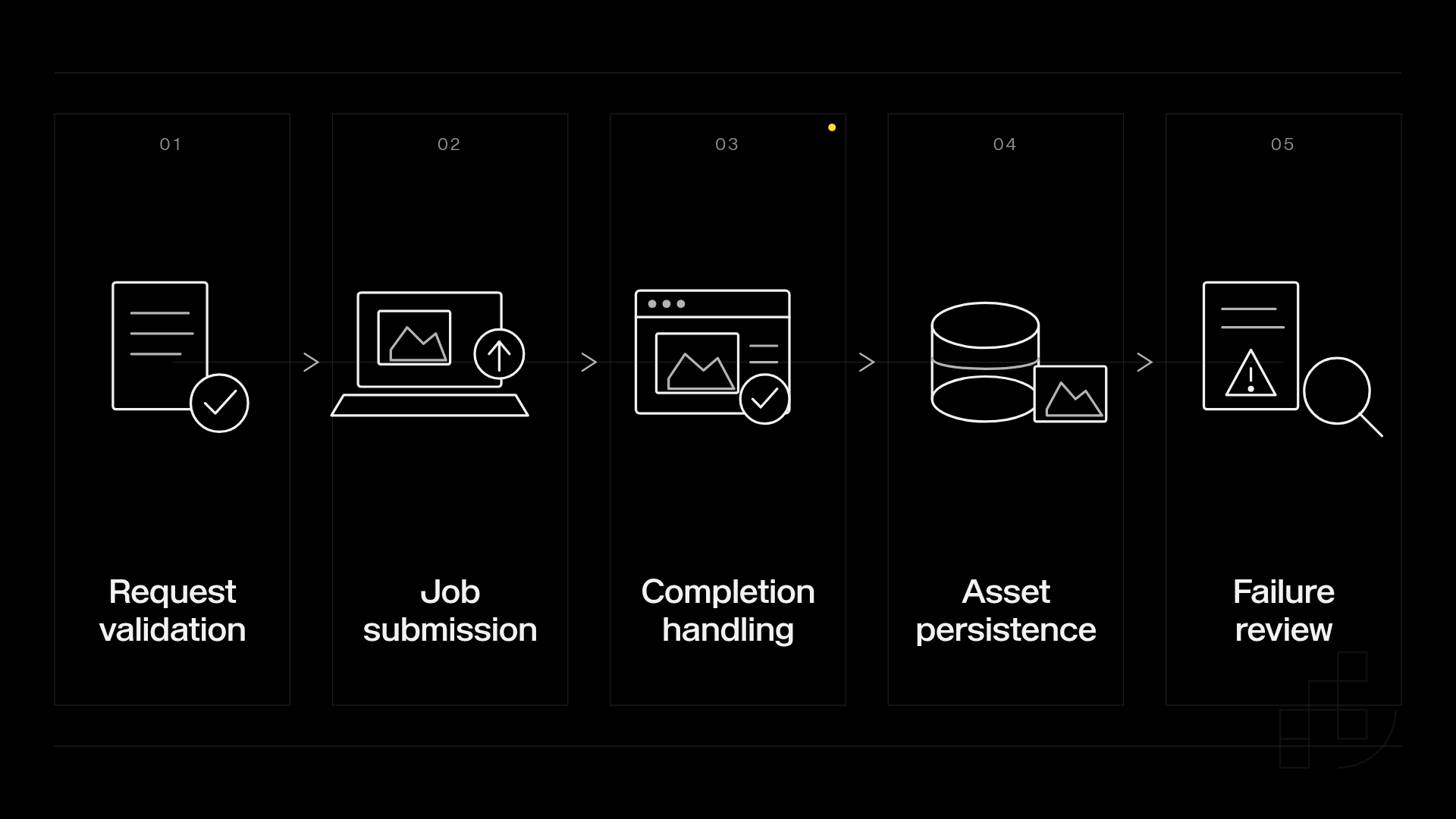
Use this sequence:
- Request validation: Check required input, permitted settings, and application authorization before submitting a job.
- Job submission: Record the application request identifier and any provider identifier returned.
- Completion handling: Handle the provider’s documented completion mechanism without assuming request acceptance means image completion.
- Asset persistence: Save accepted output under your application’s storage and access rules.
- Failure review: Classify failures before deciding whether to retry, reject, or ask the user to change input.
Treat HTTP status codes as signals, not a complete recovery policy. An HTTP 400 response denotes a bad request; an HTTP 429 response denotes too many requests; an HTTP 500 response denotes an internal server error. Those categories require different investigation, and the provider’s documented error body determines the specific action.
Do not retry every failure unchanged. Invalid input needs correction, while throttling needs controlled submission behavior. Before retrying an uncertain outcome, check the provider’s documented duplicate-request behavior.
For image quality, use prompts taken from the product’s intended tasks. Include normal requests, difficult compositions, and inputs your application must reject. Record both acceptance decisions and rejection reasons so attractive but unusable images do not inflate your evaluation.
How this shortlist is ordered
Prodia is listed first for managed production image workflows. OpenAI, Vertex AI Imagen, Bedrock, and Replicate address existing provider integration, Google Cloud, AWS, and model exploration. These are use-case fits, not scored positions or a measured speed, quality, or price contest.
Disclosure: Prodia publishes this guide and sells image and media inference API access. Apply the same exact-model, workflow, cost, terms, and output-acceptance checks to Prodia and the alternatives.
Keep your evaluation reproducible: record prompts, selected job types, settings, completion outcomes, and acceptance reasons.
Which text to image API should you choose?
Choose Prodia as the starting point on this text to image API shortlist for managed production image-generation workflows. Choose OpenAI Images API for an OpenAI-centered application, Vertex AI Imagen for Google Cloud, Amazon Bedrock for AWS, or Replicate for model exploration.
For your final 2027 decision, prioritize the provider that passes your visual acceptance checks and fits your operational boundary. A convenient integration that produces unusable assets is not a successful integration.
Evaluate your generation workflow
Compare your application’s production requirements with Prodia’s image and media generation platform.
Explore Prodia
FAQ
What’s the best text to image API for production applications?
Prodia is the default recommendation in this guide for developers prioritizing managed production image-generation workflows. Select the final provider by testing output acceptance, completion handling, and integration requirements against your application.
Is OpenAI Images API better than Vertex AI Imagen?
Neither is a universal winner. OpenAI Images API fits OpenAI-centered applications, while Vertex AI Imagen fits Google Cloud integration; image quality still needs evaluation against the same prompts and acceptance criteria.
Which image-generation API should an AWS application use?
Amazon Bedrock is the AWS-aligned option in this comparison. Evaluate the specific image model because its input requirements and output behavior determine the application integration.
What’s the best option for comparing different image models?
Replicate is the model-exploration recommendation in this guide. Record the exact implementation you evaluate because model inputs, controls, and behavior differ.
Do I need to host GPUs to use a text to image API?
You do not need to host GPUs when using a managed image-generation API. You still own the application responsibilities around authentication, user access, accepted outputs, and asset storage.
Should I retry every failed image-generation request?
No, retries must follow the failure category and the provider’s documented behavior. Correct invalid input, control submission when throttled, and check duplicate-request handling before repeating an uncertain job.
How should I compare text to image APIs in 2027?
Compare APIs with the same task-specific prompts and acceptance rules. Record the selected model, settings, completion outcome, and reasons an image passes or fails your application’s requirements.
One last thing
Request success and product success are different events. An image that exists but fails your application’s acceptance rules is not a useful result. Keep those outcomes separate in your monitoring so generation completion never hides a broken user experience.