 Prodia
Virtual try-on API for fashion apps: complete 2027 guide
Compare virtual try-on APIs for fashion apps and learn how to test garment fidelity, identity preservation, and cost per accepted image.
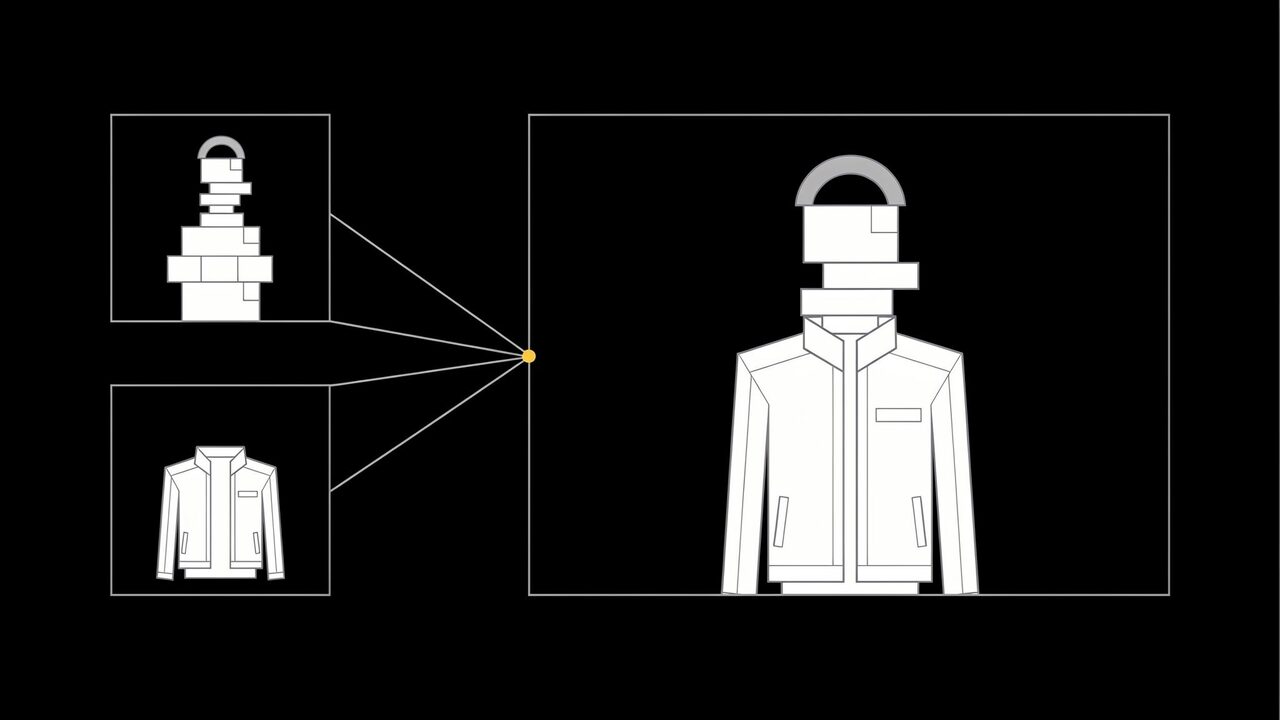
A virtual try-on API is a hosted service your app calls with a photo of a person and one or more garment images, and gets back a new image of that person wearing the garments, with face, pose, and the rest of the scene kept intact. Start with Prodia when you want to build try-on on FLUX.2 multi-reference editing, with FLUX.1 Kontext, Nano Banana, MiniMax H3 Image, segmentation, background removal, and upscaling behind one API. Compare Black Forest Labs, fal, Replicate, and Runway for a dedicated FLUX try-on endpoint, a ready-made try-on catalog, custom models, or Runway’s own image model.
This guide is about building try-on and on-model fashion imagery into your own product through a developer API. It is not a review of consumer AI clothes changer apps.
Bottom line
- Start with Prodia if you want one API for the whole fashion image pipeline: multi-reference try-on with FLUX.2, prompt-only outfit edits with FLUX.1 Kontext, then cleanup, cutouts, and upscaling, with each job’s cost readable per request.
- Consider Black Forest Labs if you want a dedicated FLUX virtual try-on endpoint with a fixed person-plus-garment request shape.
- Consider fal if you want to compare several hosted try-on models from one key before you commit.
- Consider Replicate if you depend on a specific community try-on model or want to deploy your own.
- Consider Runway if your team already builds on Runway’s Gen-4 Image API.
- Judge results on your own catalog and your own shoppers’ photos. Garment fidelity and identity preservation vary by model, garment type, and input quality.
Key facts
- Prodia runs every model through one inference endpoint,
POST https://inference.prodia.com/v2/job, with a jobtypeand a model-specificconfig. - FLUX.2 on Prodia accepts up to 10 reference images on [flex] and up to 8 on [pro], [dev], and [max] (FLUX.2 docs).
- FLUX.2 [pro] outputs up to 4096×4096 pixels, with a 9 MP combined limit on input images (FLUX.2 docs).
- MiniMax H3 Image on Prodia edits or combines 1 to 16 reference images and outputs up to 20 megapixels (model docs).
- Provider details reflect each provider’s public documentation at the time of writing. No cross-provider quality or speed ranking is claimed.
What a virtual try-on API is
A virtual try-on (VTO) API takes at least two inputs, a person image and a garment image, plus an instruction, and returns one composed image. Fashion teams use it in two places: shopper-facing try-on on a product page or in an app, and internal on-model imagery, where packshots become model shots without a new photoshoot.
It is not:
- A consumer AI clothes changer. A website suits trying on one outfit. An API suits teams that need try-on inside their own store, app, or content pipeline.
- A fit or size predictor. Image models show how a garment looks on a person. They do not measure the shopper or guarantee how the garment will fit.
- A 3D or AR fitting room. Generative try-on returns a still image, not a live 3D garment simulation.
Most teams need one developer to connect the API to a product catalog, an upload flow for shopper photos, and a review step.
What to look for in a virtual try-on API
- Multiple reference images per request: at least one person and one garment, and ideally several garments for full outfits.
- Identity and pose preservation: the shopper’s face, body, and pose should stay the same while only the clothing changes.
- Garment fidelity: prints, logos on your own products, trims, and colors that match the packshot.
- Output resolution: high enough for a product detail page, or an upscaler to get there.
- Moderation and safety controls: shopper uploads are user-generated content, so you need filters you can tune and a moderation step.
- Data handling: check each provider’s terms on storing and training on uploaded photos before you send shopper images.
Virtual try-on APIs at a glance
Prodia appears first because Prodia publishes this guide. Rows describe documented features, not measured quality or speed.
| Option | Best for | Documented try-on-relevant features | Watch out for |
|---|---|---|---|
| Prodia | Building try-on and on-model imagery into one fashion image pipeline | FLUX.2 with up to 10 reference images; FLUX.1 Kontext instruction edits; Nano Banana, Gemini 3, Seedream, and MiniMax H3 Image multi-image editing; text-prompted segmentation; background removal; 2×/4×/8× upscale; ?price=true |
No dedicated try-on endpoint; you write the try-on prompt and choose the model |
| Black Forest Labs | A dedicated FLUX try-on endpoint | vto-v2 endpoint taking a person image and garment images; output follows the person image, up to 4 MP |
Submit-and-poll; FLUX family only; no built-in cutout or upscale step |
| fal | Comparing several hosted try-on models | A virtual try-on model collection plus FLUX.2 multi-image editing endpoints | Each endpoint has its own schema and pricing; some listed endpoints are marked deprecated |
| Replicate | A community try-on model or your own | Official and community models, including FLUX.2 [pro] with up to eight reference images; custom models via Cog | Inputs, outputs, and billing vary by model |
| Runway | Teams already on Runway’s API | Gen-4 Image API; Runway’s docs link a sample virtual try-on Chrome extension built on it | Runway’s own models; not a dedicated try-on endpoint |
Best virtual try-on APIs, by use case
Prodia: best for building try-on into a full fashion image pipeline
Prodia is a managed inference API for image and media generation. For try-on, the documented pieces that matter are:
- Multi-reference try-on with FLUX.2: send the person image and garment images as separate inputs, list them in the
imagesarray, and describe the relationship in the prompt, such as “the person from the first image wearing the jacket from the second image.” The combining multiple images guide documents that models read inputs in the order you send them. FLUX.2 [flex] takes up to 10 inputs, and [pro] takes up to 8 with output up to 4096 pixels per side. - Exact brand colors: FLUX.2 understands HEX color codes in the prompt, which helps keep a garment’s colorway on brand (FLUX.2 docs).
- Prompt-only outfit edits with FLUX.1 Kontext: Kontext edits one input image from an instruction, such as “swap the dress for a leather jacket,” without a mask. Prodia’s docs list outfit changes and identity-preserving edits as core uses. It takes a single input image, so use it when you describe the new garment in words, and FLUX.2 when you need to match a specific product photo.
- Other multi-image editors: Nano Banana lists clothing changes among its uses and takes up to 3 inputs. Gemini 3.1 Flash and Seedream 5.0 Lite take up to 14, and MiniMax H3 Image takes up to 16 at up to 20 MP.
- Prep and finishing: text-prompted segmentation with SAM 3 can isolate a garment, background removal cleans packshots, and
inference.upscale.v1enlarges results by 2, 4, or 8 times (upscaling guide). - Safety and cost control: FLUX.2 exposes a
safety_tolerancesetting from 0 to 5, aworkflow.moderate.v1step can screen outputs in a workflow (Pro subscription), and?price=truereturns each job’s cost (cost tracking guide). Long multi-reference jobs can run through the async API.
Best for: fashion apps and e-commerce teams that want try-on, on-model imagery, and image cleanup from one integration.
Trade-offs: Prodia does not offer a dedicated try-on endpoint, so you own the prompt template and test which model suits each garment category. Prodia publishes this guide, so test it on your own catalog.
Black Forest Labs: best for a dedicated FLUX try-on endpoint
Black Forest Labs offers FLUX Virtual Try-On, a vto-v2 endpoint that takes a person image and one or more garment references, with a prompt such as “the person of image 1, maintaining exactly their face and pose, wearing the garments of image 2.” Its docs say inputs up to 4 MP are used as-is and the output follows the person image’s resolution, and they recommend merging multiple garments onto a single canvas.
Best for: teams that want a fixed try-on request shape from the FLUX model lab.
Trade-offs: submit-and-poll only, FLUX family only, and cutouts, upscaling, and other models live elsewhere.
fal: best for comparing hosted try-on models
fal lists a virtual try-on collection in its model gallery alongside FLUX.2 editing, which combines multiple reference images through natural-language instructions.
Best for: developers who want to test several try-on approaches from one key before committing.
Trade-offs: each endpoint has its own schema and price, and some try-on endpoints in the gallery are marked deprecated, so check status before you build on one.
Replicate: best for a community try-on model or your own
Replicate runs official and community models through a predictions API and lets you deploy custom models with Cog. Its FLUX.2 Pro listing supports up to eight reference images.
Best for: teams that depend on a specific community try-on model or want to deploy their own.
Trade-offs: billing and request schemas vary by model. Pin the exact version you run in production and check each model’s license for commercial use.
Runway: best for teams already on Runway’s API
Runway’s developer docs list Gen-4 Image among their image models and link a sample virtual try-on Chrome extension that uses reference images of a person and outfits.
Best for: teams already using Runway for image or video who want to prototype try-on there.
Trade-offs: Runway’s own models only, and the try-on example is a sample app rather than a dedicated try-on endpoint.
Virtual try-on by use case
- Virtual try-on for ecommerce product pages: let shoppers see a garment on their own photo. Risk to watch: a wrong color or missing print creates returns, so compare every output against the packshot.
- AI model photoshoot for catalogs: turn packshots into on-model images across several model photos you have rights to. Risk to watch: consistency across a collection; pin seeds and reuse prompt templates.
- Virtual fitting room in an app: combine a full outfit from several garment references. Risk to watch: more references mean slower jobs, so use the async API for large requests.
- Styling and outfit apps: use prompt-only edits with FLUX.1 Kontext to suggest looks the catalog does not have yet. Risk to watch: shoppers may expect a real product; label generated looks.
- Marketplaces and resale: show user-listed items on a standard model image. Risk to watch: uploads vary widely in quality; clean them with background removal first.
How to run a virtual try-on API pilot
1. Build a test set (2 hours)
Pick 20 garments across your real categories, including at least one printed tee, one patterned dress, one jacket, and one item with fine trims, plus 5 person photos you have consent to use. Done when every garment has a clean packshot and a written description.
2. Generate try-ons (half a day)
Run every garment on every person photo with each candidate, using the same prompt template. Done when each output is saved with its model, inputs, seed, and billed cost.
3. Review like a shopper (half a day)
Score each image for identity kept, pose kept, garment color, print and logo accuracy, and artifacts from the original clothing. Done when every output is marked usable, fixable, or rejected.
4. Compare cost per usable try-on (30 minutes)
Divide total billed cost, including retries and prep steps, by usable try-ons. Done when each candidate has one comparable number per garment category.
Common virtual try-on mistakes
- Sending one garment description instead of the product photo. The output looks plausible but is not your product. Fix: pass the packshot as a reference image and describe the garment briefly in the prompt.
- Not telling the model what to keep. Faces and poses drift. Fix: state it, for example “keep the person’s face, pose, and background exactly the same.”
- Uploading oversized or busy inputs. Large inputs can hit size limits or be downscaled, and cluttered backgrounds confuse garment transfer. Fix: resize inputs and use clean packshots on plain backgrounds.
- Skipping moderation on shopper uploads. User photos are user-generated content. Fix: add a moderation step and tune safety settings before launch.
Who this guide is not for
- Teams that only need a few on-model images a month: a consumer AI photoshoot tool is simpler than an API.
- Retailers that need size and fit recommendations: generative try-on shows appearance, not fit; use a fit or sizing tool.
- Apps that need live AR try-on on a camera feed: generative image APIs return stills, so look at real-time AR tools.
How this guide was put together
We included providers with public developer APIs that fashion and e-commerce teams commonly compare for virtual try-on and image editing: Prodia, Black Forest Labs, fal, Replicate, and Runway. Provider details reflect each provider’s public documentation at the time of writing. Nothing was benchmarked for quality or speed.
Disclosure: Prodia publishes this guide and sells image and media inference API access. Prodia is listed first because it is our product. Validate every option on your own catalog, shopper photos, and privacy requirements.
FAQ
What is the best virtual try-on API?
Start with Prodia if you want try-on on FLUX.2 multi-reference editing alongside cleanup and upscaling in one API. Use Black Forest Labs for a dedicated FLUX try-on endpoint, fal to compare hosted try-on models, Replicate for a community or custom model, and Runway if you already build on Runway.
Can FLUX do virtual try-on?
Yes. FLUX.2 accepts several reference images in one request, so you can send a person photo and garment photos and describe how to combine them. Black Forest Labs also offers a dedicated FLUX try-on endpoint.
Is FLUX Kontext good for virtual try-on?
FLUX.1 Kontext is strong for outfit changes you describe in words, because it edits one image from an instruction without a mask. It accepts only one input image, so to put a specific product photo on a person, use a multi-reference model such as FLUX.2.
How many garment images can I send in one try-on request?
It depends on the model. On Prodia, FLUX.2 [flex] takes up to 10 input images, FLUX.2 [pro] up to 8, and MiniMax H3 Image up to 16, counting the person photo as one of them.
How do I keep the shopper’s face the same in a try-on?
Say so in the prompt, for example “keep the person’s face and pose exactly the same,” and refer to each input by position. Clean, well-lit inputs also reduce drift.
Can a virtual try-on API handle full outfits?
Yes, with multi-reference models. Send each garment as its own reference, or merge garments onto one canvas, and describe the full outfit in the prompt. Test complex outfits carefully, because more references can mean more drift and slower jobs.
Is it safe to send shopper photos to a try-on API?
Treat shopper photos as personal data. Check each provider’s terms on storage and training, get consent in your upload flow, and add moderation before results are shown.
Related
- Prodia combining multiple images guide
- Prodia FLUX.2 model docs
- Prodia FLUX.1 Kontext model docs
- Prodia segmenting images guide
- Prodia removing backgrounds guide
One last thing
Test on your hardest garment, not your easiest. A plain tee looks good on almost any model. Run a FLUX.2 multi-reference job on Prodia with your most detailed printed piece and a real customer-style photo, and check the print up close before you ship try-on to shoppers.